OpenHands SDK: Build Agents That Run Terminal Commands
The OpenHands project logs 2,013 commits while powering a modular SDK for code-centric AI agents. This toolkit serves as the fundamental engine for the OpenHands CLI and OpenHands Cloud, offering a clean architecture for developers who need more than simple chat completions. Engineers can now construct production agents using set Python and REST APIs that handle everything from dependency updates to complex repository refactors.
The OpenHands Software Agent SDK enables both local machine workspaces and ephemeral execution environments via Docker or Kubernetes. Running tasks on a local setup differs fundamentally from deploying to remote servers for scalable, multi-agent operations.
Agents are defined in code: import LLM, Agent, Conversation, and Tool from openhands.sdk, point the model at gpt-5.5, and hand the agent TerminalTool and FileEditorTool inside a workspace you choose. Under the MIT license the same agent code executes routine maintenance or substantial rewrites without manual intervention, whether that workspace resolves to a local directory or a remote host.
OpenHands SDK: Python APIs, Agentic Loops, and Model Choice
OpenHands SDK Definition: Python-First Agent Architecture
The OpenHands Software Agent SDK applies a collection of Python and REST APIs designed to define autonomous coding agents directly within source code. The software-agent-sdk repository is public and written primarily in Python, at 98.7% of the codebase. Unlike static code completion tools, the framework implements a full agentic loop that integrates terminal command execution, web browsing, and GitHub pull request management into a single operational cycle. This architectural shift supports higher autonomy, allowing agents to resolve complex engineering tasks rather than generating isolated text snippets.
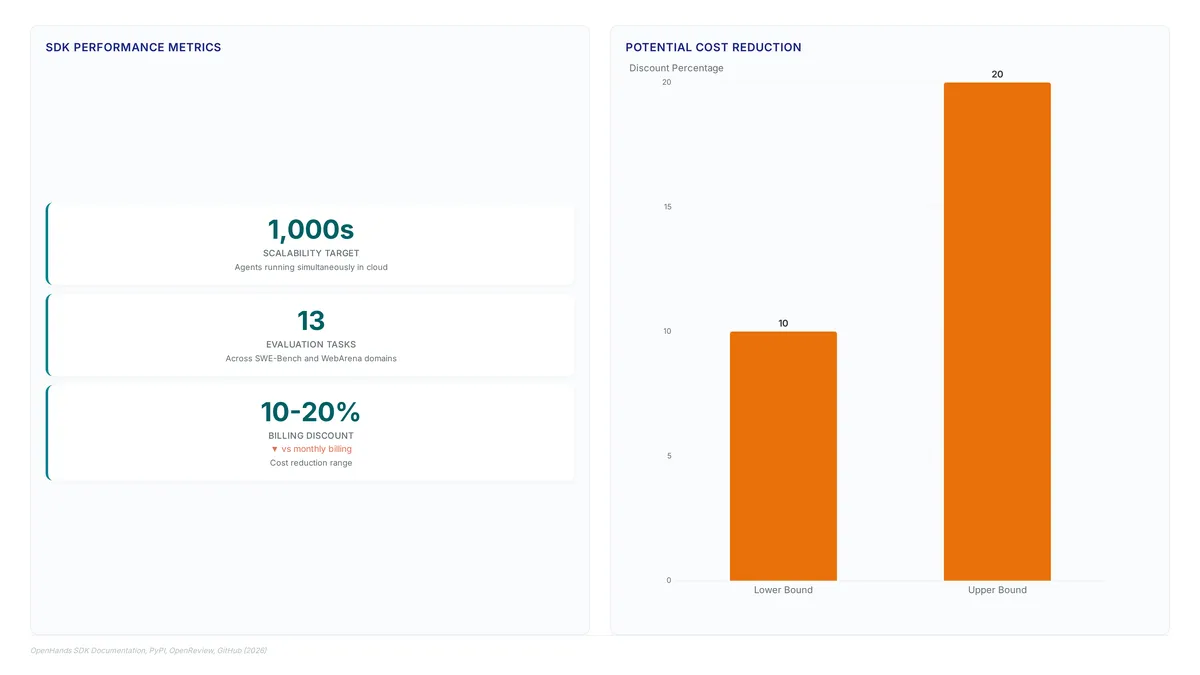
Skill definitions within this system extend beyond simple function calling to include flexible activation of public capabilities for modern package tooling, such as uv and deno. Evaluations of these agents occur across 13 challenging tasks, covering domains such as software engineering via SWE-Bench and web navigation through WebArena. The project achieved its milestone of over 65,000 stars within a rapid timeframe of just 18 months since its inception. The core codebase is released under the permissive MIT license, facilitating broad adoption and modification by the community.
Executing Agentic Loops: Terminal, Browsing, and Pull Requests
OpenHands executes full agentic loops by chaining terminal commands, web browsing and pull request submissions into single autonomous workflows. Basic coding assistants generate static text, yet this framework enables agents to interact dynamically with the development environment. Safety remains a priority through sandboxed Docker environments as agents receive powerful permissions. This architecture allows the agent to read a task, write code, run tests, browse documentation, and submit changes without human intervention.
Builders enabling web browsing allow agents to access documentation and external resources as part of their workflow. The platform provides the flexibility to run locally on a user's machine or scale to thousands of agents in the cloud, a hybrid deployment model. Operational focus shifts toward defining precise workflows and using tools like TerminalTool, FileEditorTool, and TaskTrackerTool within the workspace boundaries.
Model-Agnostic SDKs vs Rigid Pre-Packaged Coding Solutions
Developers apply composable SDKs to define custom workflows rather than relying on rigid, pre-packaged solutions. This architectural shift enables the construction of model-agnostic agents capable of interfacing with various large language models, allowing users to switch between different LLMs without being locked into a specific vendor's system. Proprietary systems bind users to specific ecosystems, whereas this approach allows operators to optimize costs by switching LLM providers dynamically.
The open-source nature of the project enables community contributions and transparency that closed-source alternatives lack. The core software is available under the MIT license, while enterprise offerings or components may have different licensing structures, distinguishing between community and commercial tiers. Operators gain full control over the agentic loop, ensuring that critical development tasks remain portable across infrastructure changes. Portability maintains continuity in production environments where provider outages or policy shifts could otherwise halt operations entirely.
Inside the Agent Architecture: Workspaces, Tools, and Skills
OpenHands Agent Workspace and Public Skills Architecture
The agent workspace operates as an isolated execution environment where code operations occur, supporting both local directories and ephemeral containers. This separation keeps file edits and terminal commands contained within set boundaries, preventing unintended system-wide changes. Developers define this scope explicitly when initializing a conversation, anchoring the agent to a specific working directory or remote volume. Public capabilities extend beyond basic file editing through an extensions marketplace, which supplies pre-built skills for modern tooling. Enabling specific context configurations allows agents to automatically detect repository markers and apply appropriate package management logic. Such a mechanism reduces boilerplate configuration by dynamically loading proficiency for various ecosystems based on detected files.
| Component | Function | Activation Method |
|---|---|---|
| Workspace | Isolated file and command scope | Set at initialization |
| Tools | Primitive actions (edit, run) | Passed in agent constructor |
| Public Skills | High-level workflow logic | Context configuration flag |
Tension exists between immediate skill availability and environment purity. Loading public skills simplifies onboarding but introduces external dependencies into the agent's runtime context, potentially conflicting with strict security policies in regulated enterprises. Builders must weigh the convenience of auto-detected behaviors against the need for fully auditable, static toolsets in production pipelines.
Activating Public Skills with AgentContext and Package Markers
Enabling the public skills flag grants agents immediate access to specialized logic for modern package managers. This configuration triggers an automatic scan for specific file markers within the target workspace. Upon detection, the agent retrieves the execution patterns from the marketplace without requiring manual tool definition. Builders should deploy this feature when managing repositories that rely on complex or frequently updated dependency chains. The SDK's composable architecture supports this flexible loading, allowing developers to construct custom agentic workflows rather than depending on rigid, pre-packaged solutions. Agents then adhere to current best practices set by the underlying package system.
| Marker File | Detected Skill Target |
|---|---|
uv.lock |
Python dependency resolution |
deno.json |
TypeScript runtime configuration |
deno.lock |
Deno lockfile validation |
deno.jsonc |
Commented Deno configuration |
The SDK automatically picks up current package-management guidance for repositories that use these markers. Engineers can reference the standalone SDK demonstrations for a minimal implementation example. Thorough API references and further architectural details remain available in the official documentation. Proper activation reduces the need for explicit tool declarations in the agent definition block.
Verifying that the public skills flag loaded correctly, by confirming the agent picks up the marker file for the repository's package manager, ensures the SDK retrieves the correct execution patterns from the marketplace rather than relying on generic command execution. Explicitly testing this loading path isolates configuration errors from model reasoning failures. Documentation for these verification steps resides in the guides section, which details core concepts for tools and workspaces.
Deploying Agents: Local Docker Setup Versus Remote Server Execution
What Changes When the Agent Leaves the Laptop
Local execution binds the Agent lifecycle to the host machine, whereas remote deployment decouples runtime persistence from the developer's local environment. The SDK allows creation of agents using specific tools such as TerminalTool, FileEditorTool, and TaskTrackerTool to interact with codebases. In a local configuration, these tools operate within the user's immediate filesystem, limiting concurrency and risking host contamination if sandboxing is not strictly enforced. Conversely, deploying on cloud servers enables agents to continue running tasks even when local laptops are shut down, providing a persistent execution environment.
The factory Workspace(…) resolves to local when only working_dir is provided and to remote when host parameters are present, ensuring the agent code remains unchanged across environments. This architectural flexibility supports a shift toward cloud coding agents where the primary value proposition is autonomous execution rather than local assistance.
| Dimension | Local Docker Setup | Remote Server Execution |
|---|---|---|
| Persistence | Terminates when host sleeps | Continues independently of client |
| Isolation | Shared kernel resources | Fully ephemeral containers |
| Scale | Single agent per host | Thousands of concurrent agents |
Builders must recognize that local development often masks latency issues inherent in networked tool calls, which become apparent only upon scaling to remote clusters. While local setups offer rapid iteration for debugging Conversation flows, production workloads require the isolation of sandboxed Docker environments to safely execute terminal commands. The added complexity of managing remote state and securing API keys outside the local perimeter is the price of scale. Choose remote execution when agent tasks must persist beyond local laptop uptime or must be triggered by third-party services such as Slack and GitHub.
Deploying Agents with TerminalTool and FileEditorTool Locally
Local installation begins by executing make build to configure workspace dependencies and pre-commit hooks. Developers define an Agent instance using TerminalTool and FileEditorTool while supplying API keys via environment variables. The provided reference implementation configures the LLM model to gpt-5.5 for code generation tasks. This setup uses sandboxed execution within Docker containers to isolate terminal commands from the host system.
A critical limitation involves resource contention; running multiple heavy agents locally saturates CPU threads, whereas remote clusters distribute this load. Consequently, local testing validates logic quickly but fails to reproduce concurrency bugs present in production. Engineers should restrict local runs to single-agent validation before scaling to cloud coding agents for extensive refactors. This approach ensures the local environment remains stable while verifying that Tool interactions function correctly prior to distributed execution.
Building and Extending AI Agents with Custom Skills and Plugins
Defining the OpenHands SDK Import Structure and Core Classes
Production agents begin by importing LLM, Agent, Conversation, and Tool from openhands.sdk. This specific import sequence establishes the programmatic control plane necessary to define agents directly within code, separating the framework from conversational-only interfaces found in consumer-grade AI coding tools. The structure supports a composable Python library approach where developers instantiate capabilities like the TerminalTool, FileEditorTool, and TaskTrackerTool alongside a configured language model. That import is also the single point of abstraction that makes the definition portable: the same declaration targets an ephemeral Docker or Kubernetes workspace without a rewrite.
Implementing GitHub Workflows and Remote Agent Server Scenarios
The examples/ directory provides concrete templates for GitHub Workflows and remote server deployment. Developers configure WebSocket connections to maintain stateful sessions even when local devices disconnect. This architecture supports long-running engineering tasks that exceed typical interactive session limits. The repository documents client-server patterns enabling third-party services to trigger coding agents automatically. Such integration allows CI/CD pipelines to initiate refactors or dependency updates without manual intervention.
The cost structure favors running agents on dedicated infrastructure rather than proprietary cloud-only solutions. Teams gain control over runtime environments while avoiding vendor lock-in for compute resources. Adopting this model requires managing server health and scaling logic that local-only tools abstract away. Builders must implement monitoring for agent lifecycles that desktop applications typically handle implicitly. This constraint defines the boundary between prototype scripts and production-grade autonomous systems.
Checklist for Resolving Workspace Dependencies via Make Build
Execute make build to install workspace dependencies and configure pre-commit hooks before agent initialization. This single command resolves local pathing errors that frequently interrupt agent workspace operations during the first run. Developers building custom interfaces must complete this step to guarantee file system access matches sandbox expectations. Dependency versions shift often in a codebase this active, and not every example pins them explicitly. Skipping this validation often leads to missing TerminalTool binaries or failed FileEditorTool permissions.
| Check Item | Verification Method |
|---|---|
| Dependency Installation | Run make build locally |
| Hook Configuration | Inspect .pre-commit-config.yaml |
| Skill Activation | Enable load_public_skills=True |
Operators scaling to thousands of agents in the cloud require this local fidelity to prevent remote deployment failures. A missing hook configuration here manifests as silent permission denials when the Agent attempts to write to disk later. Mirroring the local environment to openhands-workspace constraints reduces drift between development and production execution contexts. This alignment is mandatory for relying on automatic package management detection for markers like uv.lock.
About
Sofia Berg serves as Research Editor at AI Agents News, where she specializes in translating complex multi-agent research and benchmarking data into actionable insights for engineers. Her deep familiarity with evaluation frameworks like SWE-bench and agentic architectures makes her uniquely qualified to analyze the OpenHands Software Agent SDK. In her daily work dissecting how autonomous systems plan and execute code tasks, Sofia evaluates the practical utility of tools that bridge theoretical research and real-world application. The OpenHands SDK, designed for building agents that interact directly with codebases, aligns precisely with her focus on tool use and multi-agent coordination. By examining its modular Python APIs and support for ephemeral workspaces, she connects the SDK's technical capabilities to the broader needs of developers building reliable coding agents. At AI Agents News, Sofia ensures that coverage of frameworks like OpenHands remains grounded in technical reality, helping builders understand not just what the software claims to do, but how it performs under rigorous engineering.
Conclusion
Scaling autonomous agents reveals that infrastructure drift becomes the primary bottleneck, not code generation quality. When shifting from local prototypes to cloud coding agents, the operational burden moves from writing prompts to managing remote runtime health and sandbox permissions. Teams often underestimate the complexity of maintaining environmental fidelity across thousands of distributed executions. Relying on implicit local configurations causes silent failures when agents encounter strict production boundaries. The real cost of adoption is the engineering time required to externalize lifecycle monitoring that desktop tools previously hid.
Parity between the two environments is what the SDK design buys back: the same Agent, Tool, and Conversation code runs against a local directory or a remote host, so the environment you hand it stays the only variable. make build is therefore where parity is established or lost, since a missing hook configuration surfaces later as a silent permission denial rather than a build error. Dependency resolution belongs on the security boundary here, not in the setup-convenience column.
Frequently Asked Questions
The repository is written primarily in Python at 98.7%. What that buys is a single extension surface: agents, tools and workspaces are declared as classes imported from openhands.sdk, so extending the framework means writing Python rather than learning a second runtime.
Yes, and the agent code does not change: the factory resolves to a local workspace when only working_dir is given and to a remote one when host parameters are present. The price of that scale is the state and secrets you now manage outside the local perimeter, plus the network latency local runs never showed you.
Agents can run inside ephemeral workspaces like Docker or Kubernetes. This isolation ensures that autonomous command execution remains safe by preventing unauthorized access to the host machine system files.
Public skills include support for modern package tooling such as uv and deno. Enabling these allows agents to automatically manage dependencies and execute complex build steps without custom code configuration.
The core codebase is released under the permissive MIT license, which is what allows integration into proprietary workflows. Read the boundary carefully: it covers the core, while enterprise offerings or components may carry different licensing, so check the tier you actually deploy.
References