Coding agent tools: IDE vs CLI reality
Augment Code claims 70.6% accuracy on SWE-bench Verified, yet the number that decides your workflow is not on the leaderboard: it is where the agent runs. Dedicated IDEs and IDE extensions buy inline speed and local file access; CLI-native agents buy system-level autonomy and demand strict permission controls; cloud platforms buy isolated sandboxes and charge for it in latency and data residency questions. Judge all four categories by the same output, which is files, diffs, and pull requests a reviewer can accept or reject.
Defining the Modern Coding Agent and Its Core Capabilities
What Separates a Repo-Aware Agent from Autocomplete
Stop thinking about autocomplete. A repo-aware coding agent autonomously executes multi-step software tasks by directly manipulating files, diffs, and pull requests within a repository context. Simple completion engines suggest single-line edits, yet these systems function by understanding and producing concrete code changes such as files, diffs, and PRs with direct or mediated access to repositories. This distinction separates simple autocomplete from autonomous execution, where the tool plans steps, runs terminal commands, and validates outputs before presenting a reviewable patch.
Real-World Application Across IDE Extensions and CLI Tools
Interface dictates capability. IDE extensions like GitHub Copilot embed directly into the editor, offering a basic tier for teams new to AI-assisted development at $10 per month to enable inline completions and chat-based refactoring. Standalone environments such as Cursor provide a dedicated workspace for deeper repository awareness at $16 per month for individuals requiring advanced context handling. Command-line tools prioritize sandboxed execution and system access, allowing agents to run untrusted code safely while managing complex multi-step operations outside the editor. This architectural separation means CLI tools like Cline CLI 2.0 introduce parallel agent capabilities and headless CI/CD pipeline support, differentiating them from tools that focus solely on interactive, single-threaded assistance within an IDE. Selecting the right category depends on whether the engineering task requires tight feedback loops or autonomous, background orchestration.
Comparing Augment Code Accuracy and Context Engine Capabilities
Augment Code differentiates its enterprise-focused architecture by prioritizing massive context ingestion over standard model constraints. The system uses a proprietary Context Engine capable of processing 200,000 tokens within a single window, enabling full-repository analysis that smaller context windows cannot sustain without aggressive truncation. This expanded scope directly influences performance on complex engineering benchmarks. The platform reports a self-reported accuracy of 70.6% on the SWE-bench Verified dataset, a metric representing the highest claimed result on this specific public benchmark for AI coding agents. Builders evaluating coding agents comparison data must weigh the benefit of higher accuracy scores against the loss of model transparency. Organizations requiring strict data sovereignty may find the lack of local execution a limiting factor despite the performance gains.
Operational Mechanics of Autonomous Code Generation and Execution
Parsing Codebases and Planning Tasks in Agent Mode
Cursor and Windsurf start work by reading entire repositories to generate concrete artifacts like files, diffs, and pull requests. This repository-aware planning lets the system suggest multi-file edits that fit existing architecture instead of spitting out isolated snippets. Anysphere released Cursor in Mar 2023 as an AI-native IDE featuring chat, inline edits, and agent mode. The underlying mechanism loops through drafting a plan, running terminal commands, and checking output against the current codebase state. Speed often clashes with safety in this autonomous model, forcing operators to rely on strict permission models. Users must approve every instance where the agent plans to run commands or access the browser, which stops unchecked recursion in complex environments. Human-in-the-loop validation allows the agent to manage high-level architectural tasks while preventing it from skipping necessary review gates. Engineering teams now shift focus from typing syntax to validating the logical chains these systems propose. Builders spend more time reviewing thorough diffs and rationales than writing code from scratch. The market now holds at least 18 distinct AI coding agents, a fragmented field where parsing full repositories is a baseline expectation. Cline emphasizes transparent logs and patch-style results for easy review. GitHub Copilot Coding Agent turns issues into PR-ready changes complete with summaries and reviewable diffs.
Executing Commands in Sandboxes and Generating Diffs
Autonomous agents isolate risky shell operations inside constrained environments before suggesting any file modifications. OpenHands, an open-source autonomous dev agent with a web UI, runs commands, edits files, and iterates toward goals within a sandbox. Output typically includes a patch or PR plus execution logs. Sandboxed execution guarantees that package installations or build scripts run without touching the host machine's global state. When a command fails, the agent captures stderr output, analyzes the error trace, and retries with a corrected sequence. Successful terminal tasks trigger the generation of a reviewable diff showing exactly which lines changed across the repository. This workflow produces git-compatible patches rather than simple text completions, allowing developers to inspect, modify, or reject changes before merging. Devin operates asynchronously in the cloud as a hosted coding agent in a cloud dev environment with an editor, terminal, and browser. It assigns tickets and delivers PR-style changes with a progress trace.
Choosing a cloud-hosted agent means trusting vendor isolation guarantees, while local agents demand strong permission controls.
Challenges in Multi-File Edit Consistency and Command Outputs
Coordinated changes across multiple files often introduce syntax errors when agents fail to lock dependencies. A refactor requires maintaining edit consistency to avoid breaking imports or function signatures in untouched modules. Cline addresses this by using project structure awareness to understand file relationships before executing writes. Cline functions as an autonomous coding agent available as an SDK, IDE extension, or CLI assistant, highlighting its multi-modal deployment architecture. Agents sometimes misinterpret compiler error messages, leading to a cascade of incorrect fixes rather than addressing the root cause. Command output parsing often fails when build logs contain non-standard formatting or truncated stack traces. A loop of failed retries can consume API tokens while the codebase drifts further from a buildable state.
| Failure Mode | Technical Cause | Mitigation Strategy |
|---|---|---|
| Import Breakage | Unlinked file updates | Require atomic commit groups |
| Infinite Retry | Misread stderr | Cap iteration count |
| Context Drift | Stale repo map | Re-index before each step |
Autonomous execution needs tighter constraints than interactive coding to remain safe. Human developers intuitively grasp partial application states, but agents need explicit success criteria for every terminal command.
Strategic Comparison of IDE, CLI, and Cloud-Based Agent Architectures
Defining the Four Architectures: Dedicated IDEs, Extensions, CLI Tools, and Cloud Platforms
Market stratification now separates agents into four distinct operational categories based on execution environment and context access. Dedicated IDE-attached agents like Cursor embed directly into the editor process, offering low-latency inline edits and chat grounded in local file system access. Conversely, IDE extensions such as GitHub Copilot function as plugins within existing environments, turning issues into PR-ready changes through deeply integrated workflows that rely on the host editor for file manipulation. Terminal-based CLI-native agents prioritize system-level autonomy, executing commands and managing multi-file diffs outside the graphical interface constraints. Remote cloud-hosted platforms operate in isolated sandboxes, handling async tasks without consuming local compute resources. The following table compares key architectural differences:
| Feature | Dedicated IDE | IDE Extension | CLI Native | Cloud Platform |
|---|---|---|---|---|
| Context Scope | Full Local Repo | Active File + Chat | System + Terminal | Sandboxed Environment |
| Execution Mode | Synchronous/Inline | Synchronous/Inline | Async/Background | Async/Remote |
| Pricing Entry | $0 | $10 | Free + API costs | $20 |
Local latency competes against environment fidelity. Local agents offer speed yet often struggle to replicate complex production dependencies without additional containerization overhead. Builders weigh the convenience of inline suggestions against the need for reproducible, isolated execution contexts when selecting a toolchain. This architectural choice dictates whether the agent acts as a co-pilot or an autonomous worker.
Matching Workflows to Agents: Local Terminal Commands vs Remote Async Execution
Select CLI-native agents for immediate, iterative refactoring where developers describe changes and the tool commits diffs incrementally. This architecture suits tasks requiring tight feedback loops, as the agent edits files and shows command output directly in the terminal without context-switching. Cloud-hosted solutions excel at asynchronous background work, connecting to repositories to deliver complete pull requests with execution summaries after long-running tasks finish. For instance, Jules by Google connects to repos, works on tasks in the background, and delivers changes as a PR/diff with a summary of steps taken. Similarly, Claude Code plans steps, edits files, and runs commands, outputting diffs and reviewable patches via CLI. Operational overhead and security posture depend on the choice between local execution and remote sandboxing. Local CLI tools demand direct system access and model key management. Cloud platforms handle infrastructure but introduce latency and potential data residency concerns.
| Feature | CLI-Native Agents | Cloud-Hosted Agents |
|---|---|---|
| Execution | Local terminal commands | Remote sandboxed environment |
| Feedback | Immediate diff output | Async PR delivery |
| Context | Full local filesystem | Repository snapshot |
| Use Case | Interactive debugging | Background maintenance |
Speed conflicts with safety. Local agents offer rapid iteration but risk unintended system changes if prompts lack precision. Cloud agents mitigate this risk through isolation but sacrifice the ability to interact with local development servers or private network resources. Some cloud agents are deeply integrated into specific workflows, researching repos and creating branches. Other tools emphasize broader system access like running commands and using the browser. This segmentation ensures that the operational category aligns with the specific engineering constraint.
Practical Implementation Workflows for Integrating Agents into Development
VS Code Extension Versus CLI: Two Presence Models
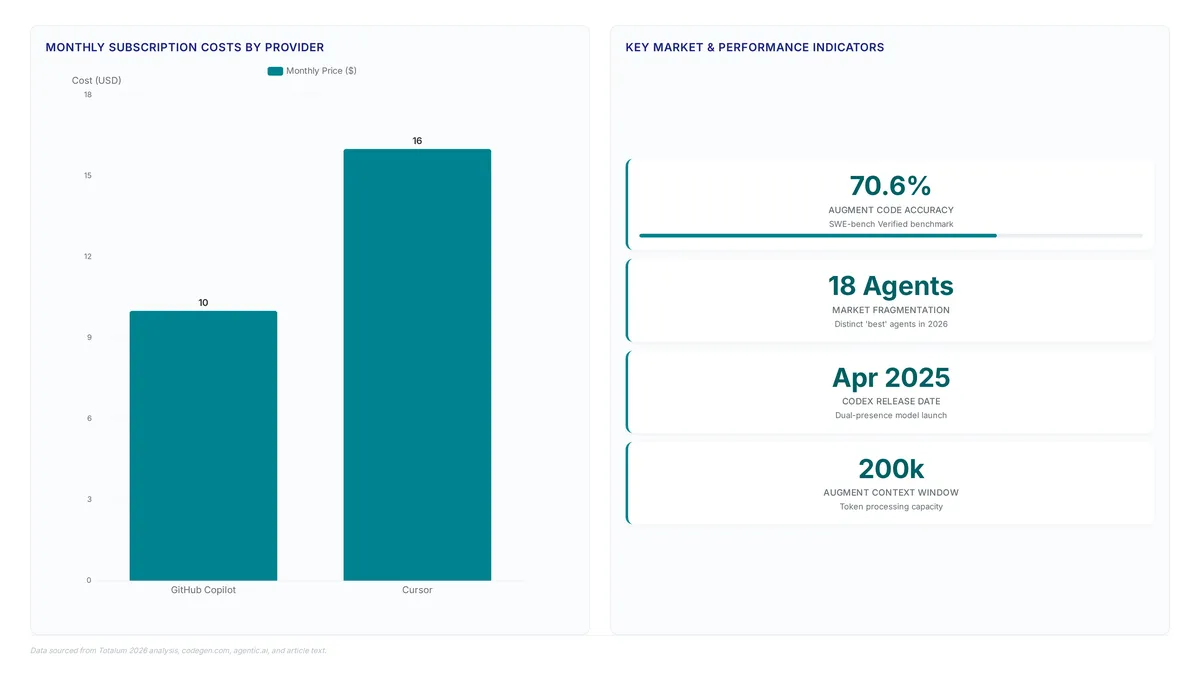
System processes execute separately from the editor, demanding explicit file permissions and standard I/O piping to read codebases or run terminal commands. Codex by OpenAI, released in April 2025, exemplifies this dual-presence model by offering both a VS Code extension for interactive chat and a CLI for repo-aware edits. The extension workflow enables interactive chat and diff workflows, while CLI implementations often handle larger, multi-step refactors in hosted environments or headless modes where direct editor integration is unnecessary. A sharp distinction exists in how these tools manage terminal command execution; extensions like Cline run terminal commands using user model keys with transparent logs, while CLI agents provide repo-aware edits and parallel agent capabilities. This difference impacts security posture and the ability to use existing shell configurations. Builders must select based on whether their workflow demands deep integration scope with Git branches or raw system access. Extensions hide complexity for speed, whereas CLI tools expose configuration overhead for greater control over the execution environment.
Executing Reviewable Diffs and Patch-Style Results in Practice
Tools like Cline emphasize transparent logs and patch-style results, ensuring every file modification appears as a discrete, auditable change set before application. This approach forces the agent to serialize its intent into a standard diff format, allowing engineers to verify logic line-by-line within their IDE. Unlike raw completion, this workflow separates planning from execution, reducing the risk of accidental syntax errors entering the main branch. GitHub Copilot differentiates this process by automating branch creation; the system researches the repository, formulates an implementation plan, and commits code changes to a new branch for human validation. This integration with Git workflows transforms the agent from a chat interface into a collaborative colleague that prepares Pull Requests ready for final review. The operational benefit is a clear separation between the agent's proposed state and the protected main branch. Complex multi-file refactors may still require manual intervention to reconcile divergent logic paths before a merge can occur. Engineers must treat these patch-style results as draft proposals, rigorously testing the generated diff against local unit tests before accepting the change. Skipping this verification risks propagating subtle logical errors that pass syntax checks but fail runtime requirements.
Mitigating Errors When Fixing AI-Generated Incorrect Code
Agents like Claude Code plan steps and output reviewable patches, yet raw terminal access introduces execution risk if the model misinterprets directory state. Engineers can apply dry-run modes where diff generation precedes any write operation. This separation allows verification of logic without altering the working tree. Routing that execution through a remote sandbox contains the damage: malformed scripts or infinite loops terminate inside the container rather than crashing the developer's workstation. Remote sandboxes may introduce latency to the feedback loop during iterative debugging sessions compared to local execution. Effective workflows require agents to create implementation plans and commit changes to a feature branch rather than the main line. GitHub Copilot Coding Agent automates this by researching the repository and pushing code to a branch for human review. This approach isolates potential errors while preserving the full git history for audit trails. The friction cost remains minimal compared to merging broken dependencies or corrupted configuration files directly into production branches.
About
Marcus Chen, Lead Agent Engineer at AI Agents News, brings deep practical expertise to this comparison of coding agents. Having shipped production multi-agent systems, Chen daily evaluates orchestration mechanics, tool-use patterns, and function-calling reliability across frameworks like CrewAI, AutoGen, and LangGraph. This hands-on experience allows him to dissect coding agents not just by marketing claims, but by their actual ability to handle end-to-end tasks such as refactoring, testing, and generating concrete diffs. His work at AI Agents News focuses specifically on helping engineers distinguish between hype and genuine capability in autonomous development tools. By rigorously testing how these agents interact with repositories and CLIs, Chen provides the technical clarity builders need to select the right platform. This article reflects his commitment to surfacing real performance metrics over vendor noise, ensuring readers understand exactly how each agent operates within a modern software workflow.
Conclusion
The opening claim holds: architecture decides utility, not the benchmark number. A 70.6% score on SWE-bench Verified says nothing about whether your team can absorb sandbox latency, or whether a CLI agent's raw system access fits your security posture. Across all four categories, operational friction shifts from code generation to the cost of verifying divergent logic paths, and the real expense is not the monthly subscription but the engineering hours spent on subtle logical errors that pass syntax checks yet fail runtime requirements. Teams must treat agent output as draft proposals rather than finished solutions, enforcing a strict workflow where every change undergoes local unit testing before merge consideration.
Organizations should mandate that all agents operate in dry-run modes by default, generating diffs without altering the working tree until human validation occurs. This approach isolates execution risks within remote containers, protecting the primary development environment from malformed scripts or infinite loops. Do not allow direct terminal access without these guardrails, as the potential for repository corruption outweighs the speed gains of unchecked automation.
Start this week by configuring your team's agent settings to automate branch creation for every task, ensuring the main branch remains protected from unverified commits. This single structural change enforces the necessary separation between proposed states and production code, turning the agent into a collaborative colleague rather than an unpredictable variable.
Frequently Asked Questions
Teams new to AI tools pay $10 monthly for basic inline completions and chat features. This low pricing entry allows groups to test agentic workflows before committing to expensive enterprise tiers.
Individuals requiring deep context handling pay $16 monthly for dedicated workspace access. This pricing tier supports the standalone architecture needed for complex, multi-file edits that simple extensions cannot manage effectively.
The platform reports a self-reported accuracy of 70.6% on this specific public dataset. This benchmark score suggests strong performance, though users must still verify generated diffs since autonomy introduces review burdens.
Three failure modes dominate: import breakage from unlinked file updates, infinite retries after a misread stderr, and context drift from a stale repo map. The mitigations are structural rather than model-level, meaning atomic commit groups, a hard cap on iteration count, and a re-index before each step.
The engine processes 200,000 tokens, allowing extensive codebase analysis within a single window. This massive context capacity enables full-repository understanding that smaller windows cannot sustain without aggressive truncation.
References