OpenCode agents: Build vs Plan roles explained
OpenCode's 900 contributors have driven over 13,000 commits to support its dual-agent architecture. The platform draws a hard line between direct user interaction and background task execution. Primary agents like Build possess full tool access for file operations and system commands. The Plan agent operates under restricted permissions to prevent unintended codebase modifications. Subagents such as Explore and Scout function as specialized, often read-only assistants designed for researching dependencies or mapping codebases without altering workspace state.
Effective fallback mechanisms depend on recognizing when a primary agent exceeds acceptable response thresholds or fails quality standards. Reliable error detection serves as a critical safety net when automated processes encounter failures. Configure these distinct roles correctly, and your AI coding environments remain stable even when complex tasks trigger potential errors.
The Distinct Roles of Primary Agents and Subagents in OpenCode
Primary Agents vs Subagents in OpenCode Hierarchy
Primary agents serve as the direct interface for user interaction, managing the main conversation thread and tool permissions.
In OpenCode, these entities function as the central orchestrators that users engage with directly via keybinds like Tab. The system distinguishes them from subagents, which are specialized assistants invoked for specific tasks or via @mention syntax. This hierarchy separates general workflow management from targeted execution. For instance, the Build agent operates with full tool access for standard development, whereas the Plan agent restricts file edits and bash commands to prevent unintended modifications. Subagents like Explore and Scout handle read-only codebase analysis or external dependency research without altering the workspace.
| Feature | Primary Agents | Subagents |
|---|---|---|
| Interaction | Direct user input | Invoked by parent or @mention |
| Scope | Full session context | Specialized sub-tasks |
| Examples | Build, Plan | General, Explore, Scout |
The distinction matters because permission keys are matched as wildcard patterns against tool names, allowing granular control over what each layer can execute. Unlike cloud-native agents that may process data on vendor servers, this architecture emphasizes privacy by keeping code between the user and their chosen provider. Primary agents maintain conversational state, but delegating to subagents creates child sessions that require explicit navigation commands to review outputs. The primary agent retains ultimate responsibility for tool calls even when delegating work. The project has gained significant traction, accumulating over 160,000 stars on GitHub as of early 2026, indicating strong developer interest in this permissioned agent model.
Build Agent Full Access vs Plan Agent Restrictions
The Build agent acts as the default primary assistant with all tools enabled for standard development.
Operators deploy this configuration when full access to file operations and system commands is required for execution. In contrast, the Plan agent functions as a restricted primary agent designed specifically for analysis. This role enforces a safety boundary where file edits and bash commands default to ask rather than execute automatically. Such restrictions prevent unintended modifications while allowing the model to suggest changes or create detailed plans. The distinction lies in the permission keys matched as wildcard patterns against underlying tool names. Builders select Build for autonomous coding tasks and Plan for reviewing suggestions without risk. This separation ensures that high-risk actions like shell execution remain gated during exploratory phases.
| Feature | Build Agent | Plan Agent |
|---|---|---|
| Mode | Primary | Primary |
| File Edits | Allowed | Ask (Restricted) |
| Bash Commands | Allowed | Ask (Restricted) |
| Best Use | Standard Development | Analysis & Planning |
Privacy remains a priority, with code processing occurring between the user and their chosen provider rather than on vendor servers by default. Using Plan for initial codebase exploration reduces the blast radius of potential hallucinations. Developers can switch between these roles dynamically using the Tab key or specific keybinds. This flexibility supports a workflow where safety constraints are applied contextually rather than globally.
Developers invoke Explore and Scout subagents to execute read-only research without modifying the workspace.
These specialized assistants handle distinct data domains: Explore searches local codebases for patterns and keywords, while Scout clones dependency repositories to inspect upstream source code. Users trigger them manually via @mention syntax or allow primary agents to delegate complex queries automatically. This separation ensures that file edits occur only when explicitly permitted by the active primary agent. A community of over 900 contributors supports this modular architecture, refining how agents manage context boundaries. The operational cost of running parallel research tasks remains transparent because the system calculates expenses for every chunk processed. However, relying on read-only subagents introduces latency when cross-referencing large external libraries against local implementations. Builders must balance the depth of external verification against the time required to clone and analyze full dependency trees.
Internal Mechanics of Agent Configuration and Temperature Control
Temperature Ranges and Deterministic vs Creative Output
Temperature sets LLM randomness on a scale from 0.0 to 1.0. Values between 0.0 and 0.2 produce focused, deterministic output ideal for code analysis. Mid-range settings from 0.3 to 0.5 yield balanced responses fitting general development work. Higher spans from 0.6 to 1.0 boost creativity, suiting brainstorming sessions where varied suggestions help. OpenCode applies model-specific defaults if unspecified, typically 0 for most models and 0.55 for Qwen models. This setup guarantees predictable behavior unless JSON agent definitions override it.
Many developers adjust these numbers to curate agent identity instead of trusting provider defaults. Fine-tuning temperature stops unintended variance during critical file edits while keeping research phases flexible. Overly deterministic settings might miss novel solutions. High creativity can introduce hallucinated dependencies. Builders align temperature ranges with workflow stages to keep safety and utility intact.
Implementing JSON and Markdown Agent Configuration Files
Configuration happens in two formats: JSON and Markdown. JSON lives in the opencode.json config file. This file defines agents like build, plan, or custom agents with specific modes, models, prompts, and permissions.
JSON centralizes definitions for primary and subagent roles inside one manifest. Developers pick exact model identifiers and set permissions to allow or deny for tools like bash and edit. Strict schema validation happens here.
Markdown files offer another path by embedding metadata in frontmatter alongside natural language instructions. Place files in ~/.config/opencode/agents/ for global scope or .opencode/agents/ for per-project scope. This approach simplifies version control diffs for prompt engineering while keeping logic separate from code.
Security tightens when permission keys match tool names as wildcard patterns. The LLM analyzes code or creates plans without making actual modifications unless approved. Operators verify that temperature settings fit the agent role; low values suit deterministic analysis while higher ranges support creative exploration.
Real-time cost tracking uses a getUsage function aggregating token counts for input, output, and reasoning to compute exact run expenses. This mechanism pulls pricing data dynamically so financial visibility matches technical execution. Enterprises needing audit trails should prioritize JSON. Individual developers may prefer Markdown for its concise, self-contained workflow.
Max Steps Limit and Agent Termination Risks
Max steps controls the maximum number of agentic iterations before the agent must respond with text only. This hard stop prevents infinite loops but introduces a failure mode where complex, multi-stage refactoring tasks terminate prematurely. If the limit is hit, the system prompts the model to recommend remaining tasks rather than executing them. The burden of continuity shifts back to the developer.
Static temperature ranges dictate output style. Step limits dictate operational lifespan. Agents may halt mid-refactor, leaving codebases in transient states requiring manual intervention.
Teams monitoring step consumption closely during initial deployments avoid relying on provider-set limits. Precise control over agent configuration lets teams balance autonomous execution with strict safety boundaries. No single limit fits all repository sizes. Teams test distinct step thresholds against their specific codebase complexity before enforcing global policies.
Practical Workflows for Invoking and Managing Agent Sessions
Manual @ Mention Syntax vs Automatic Subagent Invocation
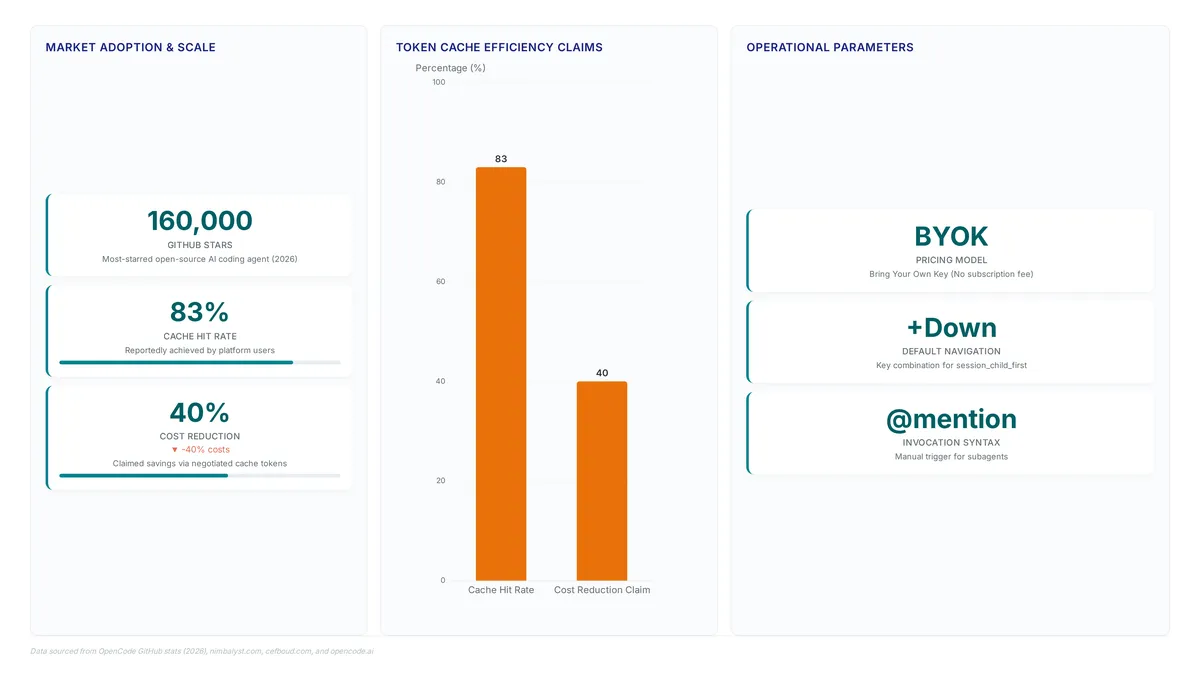
OpenCode separates automatic delegation from explicit manual triggers using the @ mention syntax. Primary agents automatically invoke subagents for specialized tasks when the conversation context matches a subagent's set capabilities. Developers override this behavior or directly assign work by typing the @ symbol followed by the agent name, such as @general help me search for this function. This manual syntax ensures precise routing when automatic heuristics might select an incorrect tool for complex queries. If a subagent appears unresponsive, the issue often stems from the primary agent failing to delegate rather than the subagent ignoring the prompt; manual invocation provides a direct method to engage the assistant. OpenCode maintains strict session boundaries where manual calls create immediate child sessions. Users navigate these parallel threads using default keybindings like Right to cycle forward or Up to return to the parent session. The limitation for this granular control is increased cognitive load, as operators must track active child sessions manually. Automatic invocation favors speed for standard workflows, while manual @ mentioning provides the deterministic control required for critical path debugging. Builders should rely on automatic delegation for routine exploration but switch to explicit syntax when tool selection accuracy is paramount.
Navigating Child Sessions with Arrow Key Shortcuts
Entering a nested workflow requires the session_child_first binding, which opens the initial child session from a parent context. This specific binding resolves common navigation failures where developers incorrectly assume standard tabbing moves focus into subagent threads. Once inside a child session, the Right arrow executes session_child_cycle to traverse sequential tasks, while Left reverses the direction for previous entries. Returning control to the main thread uses the Up arrow, mapped to session_parent, ensuring immediate context switching without command-line re-entry. These shortcuts are necessary because manual invocation via @ mention syntax creates distinct session objects that do not merge into the primary chat stream.
Developers curating their own harnesses increasingly demand this level of granular session control to maintain workflow continuity across complex engineering problems. The ability to jump between parent and child contexts mirrors the mental model of branching logic in code, allowing operators to verify subagent outputs before resuming high-level planning. A breakdown in this navigation hierarchy often leads to fragmented context windows where critical debugging steps get lost between session boundaries. As the platform scales past 160,000 stars on GitHub, maintaining efficient keyboard-driven navigation remains vital for power users managing multiple concurrent agent threads. Builders should configure these keybinds early to prevent workflow friction during deep debugging or extensive codebase exploration tasks.
Step-by-Step Guide to Customizing and Disabling Agent Behaviors
Defining Agent Permissions and Markdown Configuration Structure
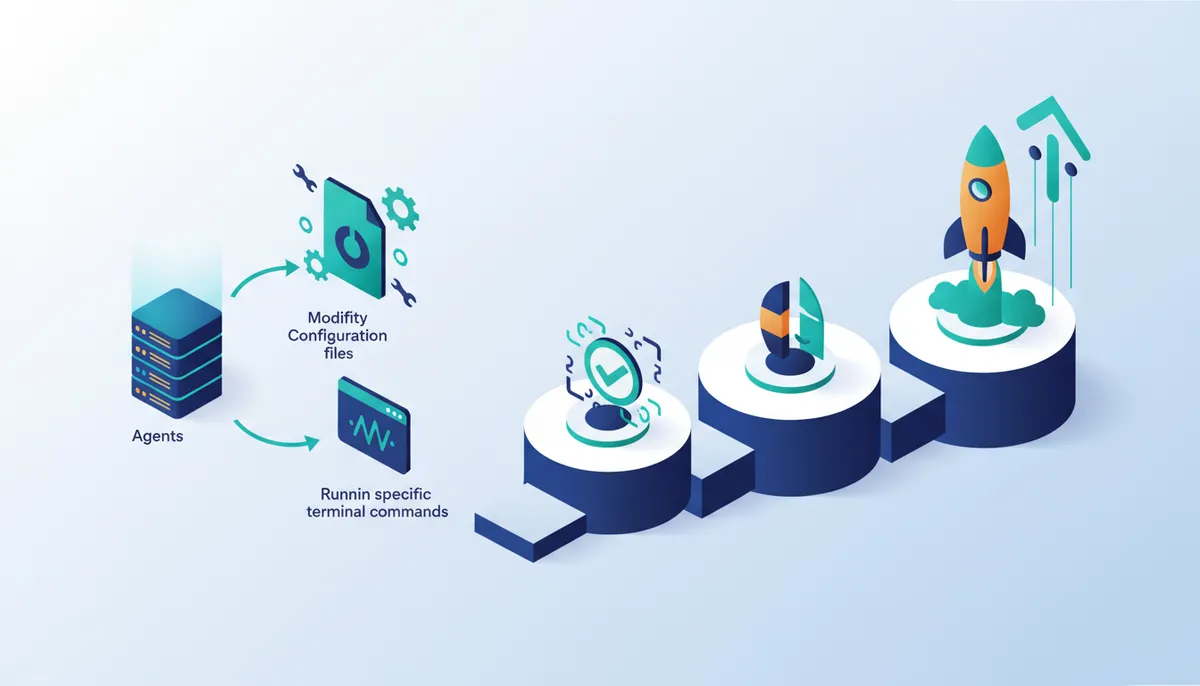
Identity stems from the markdown filename, so review.md instantly creates a review agent. Developers set boundaries by declaring permissions like edit: deny inside front-matter metadata. This design keeps identity separate from behavior, letting one file hold both the system prompt and access rules.
Configuration demands specific fields to work:
- Set the mode to
primaryorsubagentto establish hierarchy. - Declare permission blocks to restrict bash or file edits.
- Write the system prompt below the YAML separator.
Such an approach lets developers curate agent identity instead of depending on model providers for workflow limits. Markdown files offer per-project portability without touching global state, unlike JSON configurations that centralize definitions. Teams face a coordination cost though; synchronizing .md files across repositories remains a manual task to keep security postures consistent.
Permission denial acts as an absolute rule. An agent denied bash cannot run shell commands, even if the prompt explicitly asks. This constraint stops accidental system changes but needs careful planning for agents requiring mixed access levels. Separating planning and execution agents strictly reduces risk.
Executing the opencode agent create Command for Custom Roles
Running opencode agent create starts an interactive CLI sequence scaffolding a new agent by asking for save location, description, and permission boundaries.
- Execute the command to start the wizard, which prompts for the target directory and agent description.
- Select specific tool access levels, such as restricting bash execution while allowing file reads for a Security auditor.
- Generate the final markdown file where the filename defines the agent identity and front-matter sets the permission scope.
The result is a specialized assistant distinct from the default build agent, which keeps full tool access. Developers disable dangerous capabilities by setting edit: deny or bash: deny in the file header. OpenCode creates temporary Git commits for snapshotting the working state, so an unintended change from a new role can be reverted. If an @ mention fails to trigger that role, check that its description matches the task context before touching permissions.
| Feature | CLI Creation | Manual JSON Edit |
|---|---|---|
| Syntax Validation | Real-time | Post-hoc |
| Prompt Scaffolding | Automated | Manual |
| Permission Safety | Guided Selection | Manual Entry |
Creating a custom role does not disable the default build agent automatically; explicit invocation of the new role is required. Production environments must track costs carefully. The system calls a getUsage function at the finish-step stage to aggregate tokens and compute costs against real-time pricing. Accurate token consumption for input, output, and reasoning gets reported even for custom roles with restricted permissions.
Checklist for Validating Agent Scope and Disabling Unnecessary Tools
Exclude specific functionalities like system commands explicitly if the agent role does not need them. The permission block must deny bash execution for read-only tasks.
- Inspect the markdown front-matter to ensure
bash: denyis set for analysis roles. - Confirm the Explore subagent configuration lacks file modification access entirely.
- Validate that the Plan agent requires confirmation for file edits or patches.
- Test the agent against a sample prompt to verify tool rejection behavior.
| Agent Role | Required Bash | Required Edit | Effective Access |
|---|---|---|---|
| Build | Yes | Yes | Allowed |
| Plan | No (Ask) | No (Ask) | Restricted |
| Explore | No | No | Read-Only |
Unrestricted access boosts utility yet raises the risk of unintended environmental changes. Validating scope strictly before deployment reduces these operational hazards.
About
Diego Alvarez serves as Developer Advocate at AI Agents News, where he specializes in hands-on build guides and technical comparisons of autonomous systems. His daily work involves constructing and benchmarking agents using frameworks like CrewAI, AutoGen, and LangGraph, giving him direct insight into the architectural distinctions between primary agents and subagents. This practical experience allows him to dissect how main orchestrators manage tool access and conversation flow versus specialized workers. At AI Agents News, Diego focuses on helping engineers evaluate agentic patterns without vendor hype. By testing these systems end-to-end, he identifies real-world failure modes and reliability constraints often missed in theoretical overviews. His analysis connects the abstract concept of primary agents to concrete implementation strategies, ensuring readers understand not just how these assistants function, but how to effectively deploy them within complex, multi-agent workflows for production environments.
Conclusion
Scaling agent deployments reveals that operational fragility often stems from inconsistent permission enforcement rather than model capability. When primary agents retain unrestricted tool access by default, the cost of failure escalates from a simple retry to potential system-wide corruption. Organizations must recognize that explicit role invocation is not merely a configuration step but a critical security boundary that prevents accidental environmental changes. Relying on the default build agent for read-only tasks introduces unnecessary risk that compounds over time as automation expands.
Teams should immediately enforce a policy where bash execution is denied by default for any role not explicitly requiring system commands, validating this through automated testing before production deployment. This approach ensures that token aggregation via the getUsage function reflects true operational intent rather than wasteful error recovery. The window to establish these guardrails is now, before legacy configurations lock in dangerous permissions across your infrastructure.
Start this week by auditing your current agent roles against the provided validation matrix, specifically ensuring that the Explore subagent has zero file modification access. Verify that your Plan agent prompts for confirmation before any edit attempt. This immediate verification step creates the foundation for a resilient agent architecture that balances utility with strict safety protocols.
Frequently Asked Questions
Nothing breaks; edits stop being automatic. Plan sets file edits and bash commands to ask, so the model proposes a change or writes a plan and waits for your approval.
Type the @ symbol followed by the agent name, as in @general help me search for this function. The manual call opens a child session, which the arrow keys navigate.
Press the Up arrow key, bound to session_parent. Right and Left cycle between sibling child sessions, and session_child_first opens the first child from the parent.
Read-only. Explore searches the local codebase for patterns and keywords, while Scout clones dependency repositories to inspect upstream source, and neither writes to your workspace.
Select Build, the default primary agent with all tools enabled. Plan is the other primary role, and it drops file edits and bash commands to ask mode.
References