Ollama storage: Stop root disk fill on Linux
Disk pressure on Linux arrives before model fatigue when you pull multiple Ollama variants and forget embedding models.
Operational hygiene demands moving the default model directory from the root filesystem to a dedicated volume using systemd overrides. Fragile symlinks won't cut it. You need to understand how the Ollama FAQ defines the default storage path at /usr/share/ollama/.ollama/models and why setting the OLLAMA_MODELS variable via service configuration is the only auditable approach. We will cover measuring current disk usage with specific commands, selecting a secondary SSD location like /srv/ollama-models, and ensuring the ollama service account retains proper read/write access during migration.
While localaimaster.com notes that comfortable daily use targets 16 GB of RAM, your storage strategy matters more once you start hoarding open models. Stopping the service cleanly, moving the model store without corruption, and verifying the new configuration all come before trusting your workflow again. This process eliminates the risk of a single large pull crashing your host by isolating AI workloads from system critical partitions.
Ollama Model Storage Architecture and Root Filesystem Impact
Ollama Default Storage Path and OLLAMA_MODELS Variable
On Linux systems, the Ollama runtime defaults to storing model artifacts within /usr/share/ollama/.ollama/models, a location frequently situated on the root filesystem. This default storage location presents an operational constraint: accumulating standard text models alongside larger variants can rapidly consume available space on OS partitions. Administrators redirect this path using the OLLAMA_MODELS environment variable, which instructs the binary to target a dedicated data partition instead. However, setting this variable in a user shell profile fails for background processes; running Ollama as a systemd service requires editing the service unit file to persist the configuration across reboots. Unlike transient shell exports, the systemd override ensures the daemon starts with the correct storage pointer immediately at boot. The trade-off involves configuration complexity versus filesystem stability: native environment overrides maintain auditability and prevent accidental symlinks that obscure the true data location. Ignoring this distinction causes the service to ignore user-level exports, leaving the root volume vulnerable to unchecked growth while the secondary drive remains empty. Properly configured, this mechanism separates compute binaries from bulky model weights, aligning storage scalability with the variable demands of local LLM deployment.
Model Size Accumulation and Root Filesystem Pressure
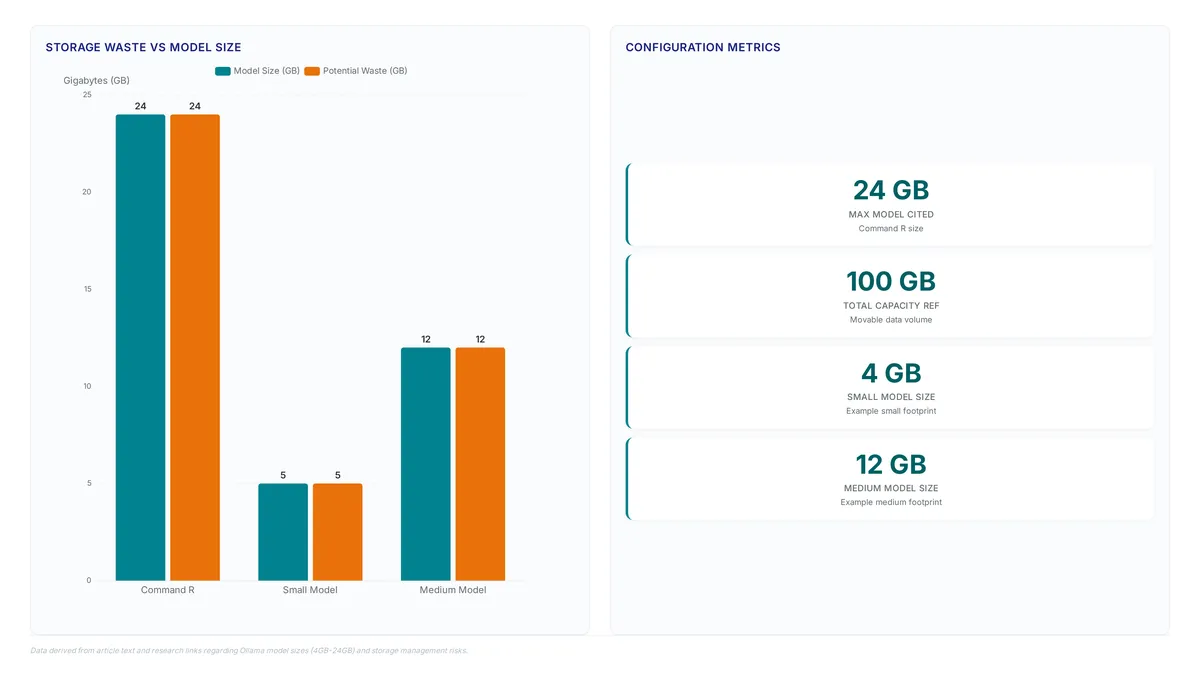
Model size accumulation rapidly saturates root filesystems when users download diverse large language models without relocating storage. Standard 7B-8B text models like Llama 3 and Mistral occupy approximately 4-5 GB, yet specialized variants like Command R consume 24 GB each. This disparity accelerates disk depletion, creating a phenomenon where operators inadvertently fill system drives intended for OS operations rather than hundreds of gigabytes of AI assets. The rapid model accumulation pattern forces immediate intervention as the default storage directory resides on partitions lacking sufficient capacity for expanding libraries.
| Model Variant | Approximate Size | Storage Impact |
|---|---|---|
| Llama 3 (7B-8B) | 4-5 GB | Moderate baseline consumption |
| Phi4 | 9.1 GB | Accelerated depletion rate |
| Command R | 24 GB | Critical saturation risk |
Moving storage resolves immediate pressure, but the underlying tension remains between convenience and capacity planning; keeping models on the root volume simplifies initial setup but guarantees future maintenance overhead. Unlike flexible data logs, model binaries are static yet massive, meaning they accumulate continuously as new versions are pulled. Administrators must recognize that root filesystem pressure stems from cumulative binary size rather than transient activity, requiring proactive partitioning strategies before reaching critical thresholds. The cost of ignoring this architecture is measurable downtime during emergency migration procedures. Implementing dedicated data volumes immediately upon deployment helps avoid service disruption.
Step-by-Step Migration of Ollama Models to Secondary Storage
Defining Safe Migration Prerequisites with du and ollama ps
Measuring recursive disk usage and spotting active memory loads comes before any file manipulation. Running sudo du -sh /usr/share/ollama/.ollama/models tallies the current storage burden sitting on the root filesystem. This number creates a baseline for verifying data integrity once the transfer finishes. At the same time, ollama ps shows which models stay loaded in memory, a state that blocks safe file movement. Stop any actively loaded model before shifting files to maintain data consistency.
Default setups often dump these heavy assets onto the primary OS drive, forcing a move to dedicated storage like an NVMe volume to stop system instability. Prune unnecessary variants with ollama rm only after halting the service and preparing the new location. Such discipline guarantees directory permissions match ollama service account needs before moving a single byte. These checks stop issues where open file handles linger. A verified inactive status is a necessary prerequisite for successful relocation.
Executing rsync Transfer to /srv with Ownership Configuration
Using rsync provides a safe, restartable copy path when migrating the model store to /srv/ollama-models. A single Llama 3 instance consumes approximately 5 GB, making data integrity during transfer necessary for large libraries. Execute the copy with specific flags to keep hard links and extended attributes found in the source directory structure.
- Run the transfer command.
- Verify the destination retains correct ownership using
ls -ld /srv/ollama-models, ensuring theollamaservice account holds read-write access. - Compare source and destination sizes with
sudo du -shto confirm bit-for-bit equivalence before proceeding.
Wrong ownership settings stop the service from writing new model layers, a failure seen often when moving large datasets without explicit chown steps. The -H flag keeps hard links intact, which some model formats use to share tokenizers or base layers efficiently. Maintaining these links preserves the original storage structure. The original data stays untouched while the copy runs, offering an immediate rollback point if the new path fails validation. Check file counts alongside total size, as a mismatch in file number often signals a partial transfer despite matching byte totals. Keep the service inactive throughout this operation to prevent write conflicts that corrupt the model registry.
Mitigating Data Loss Risks During Service Stoppage and Path Validation
Confirming the service is inactive stops file corruption during the critical migration window. Operators must see systemctl is-active ollama return inactive before touching model files, since active writes to the default path cause data inconsistencies.
- Stop the service using
sudo systemctl stop ollama. - Verify the daemon status is strictly inactive via
systemctl is-active. - Execute the data transfer to the new volume using
rsync.
Choosing the wrong storage medium adds latency that destabilizes model loading sequences. Slow or unreliable network mounts create problems unless latency and failure behaviors are tested first. Untested network paths cost measurable inference lag or complete startup failure.
Keeping the original data directory acts as a necessary rollback mechanism if the new configuration fails verification. Deleting source files right after copying removes the safety net needed to recover from systemd override errors. Preserve the initial dataset until a full restart cycle proves the new path works correctly. This temporary redundancy ensures a recovery path exists should the migrated models prove unreadable. Keep the backup for at least one full operational cycle as a recommended best practice.
Persisting Configuration Changes via Systemd Environment Overrides
Mechanics of systemd Environment Overrides for Ollama
Systemd drop-in overrides modify the [Service] section of a unit file to persist the OLLAMA_MODELS variable beyond transient shell sessions. Administrators create a dedicated directory at /etc/systemd/system/ollama.service.d containing an override.conf file that explicitly defines the environment path. This configuration forces the service to start with the correct storage pointer at boot, preventing the Root filesystem still full error common when default paths fill up. Exporting variables in a user shell lacks persistence across reboots. The [systemd] daemon reads these layered configurations sequentially, allowing specific overrides to take precedence over global defaults without altering the original unit file. Service managers do not automatically detect these file changes. Operators must execute daemon-reload to apply the new logic or the old path remains active. Verifying the active environment using systemctl show confirms the override loaded correctly before deleting original data.
Implementing Persistent OLLAMA_MODELS via systemctl edit
Administrators establish persistent storage redirection by executing sudo systemctl edit ollama to inject the OLLAMA_MODELS variable directly into the service definition. This drop-in configuration creates an override.conf file within /etc/systemd/system/ollama.service.d, ensuring the systemd daemon loads the custom path before initializing the Ollama process. This method embeds the storage pointer into the unit file itself, preventing the service from reverting to the default /usr/share/ollama/.ollama directory. Alternatively, one can create the drop-in directory manually with sudo mkdir -p /etc/systemd/system/ollama.service.d and write the same [Service] block into an override.conf file inside it.
- Run
sudo systemctl edit ollamato open the editor. - Insert
[Service]followed byEnvironment="OLLAMA_MODELS=/srv/ollama-models". - Execute
sudo systemctl daemon-reloadto register the change. - Restart the service with
sudo systemctl restart ollama.
Operators migrating substantial data must verify file ownership to avoid Permission denied errors where the service fails to read the new volume. If No models appear after the move, the issue typically stems from incorrect path syntax in the override or missing daemon-reload steps rather than data corruption. Manual file editing offers speed. The systemctl edit command guarantees syntactic validity of the unit file, reducing the risk of boot failures caused by typos. This override pattern serves as the supported mechanism for production environments requiring stable, reboot-resistant model storage configuration.
Validating Override Application and Troubleshooting Access Errors
Confirm the systemd daemon ingested the override by running sudo systemctl daemon-reload before restarting the service. Without this reload step, the unit file remains stale, and the OLLAMA_MODELS variable fails to propagate to the runtime environment.
- Execute
systemctl show ollama --property=Environmentto inspect active variables. - Verify the output explicitly contains the path
/srv/ollama-models. - Restart the daemon using
sudo systemctl restart ollama.
Administrators frequently encounter a Permission denied error if the new directory lacks correct ownership attributes for the service account. Resolve this access failure by executing sudo chown -R ollama:ollama /srv/ollama-models to align file permissions with the running process identity. If No models appear in the listing output, the issue often stems from an incomplete data migration or a misconfigured path in the drop-in file. Misconfiguration of the service environment can directly cause downtime or prevent model serving until the definition is corrected.
| Symptom | Probable Cause | Resolution Command |
|---|---|---|
| Permission denied | Incorrect owner on target volume | sudo chown -R ollama:ollama /srv/ollama-models |
| No models appear | Path mismatch or partial copy | systemctl show ollama --property=Environment |
| Root filesystem full | Legacy data remains at default | sudo rm -rf /usr/share/ollama/.ollama/models |
Validating disk usage with du ensures the legacy store at /usr/share/ollama/.ollama is removed only after successful verification. This final cleanup prevents duplicate storage consumption that negates the initial migration effort.
Symlinks Versus the OLLAMA_MODELS Variable
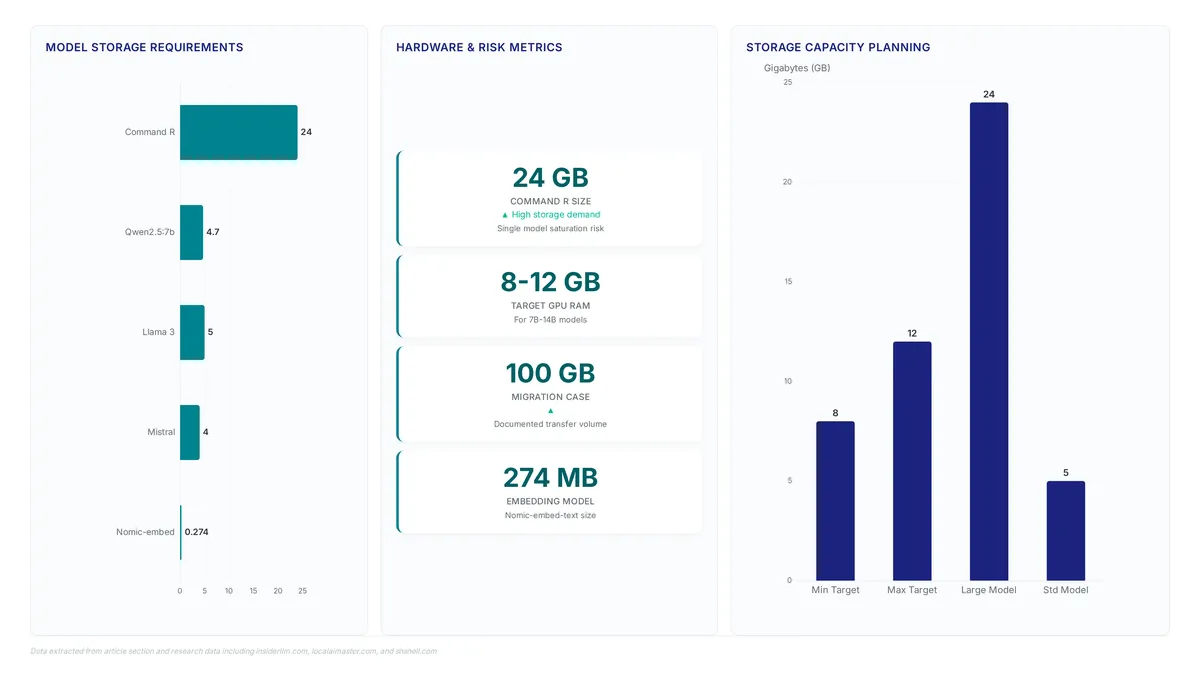
System administrators gain immediate clarity by prioritizing the OLLAMA_MODELS environment variable instead of relying on symlinks. This supported method creates an auditable configuration state that remains visible during routine checks. Creating a ln -s link from the default path might preserve compatibility with tools expecting standard locations, yet it hides the actual storage target when troubleshooting becomes necessary. Direct variable assignment forces the service to resolve the path natively, removing the risk of broken pointers should the underlying mount point shift. Such distinctions matter intensely when models accumulate rapidly. A single specialized model like Command R can consume 24 GB, quickly saturating a root partition if the redirection fails silently.
Defining this variable before the service starts is mandatory, a requirement that often demands a systemd override to survive reboots.
| Feature | Symlink (ln -s) |
Environment Variable |
|---|---|---|
| Visibility | Low (hidden redirect) | High (explicit config) |
| Persistence | Filesystem dependent | Service config dependent |
| Failure Mode | Broken link errors | Service startup failure |
| Audit Trail | Requires inode check | Visible in unit file |
Symlinks introduce a dependency where the operating system resolves the path before the application loads, whereas the native method forces the ollama process to read the intended directory directly. Explicit declarations simplify verification because operators can inspect the running service environment to confirm the storage location strategy without dissecting filesystem links.
About
Priya Nair serves as AI Industry Editor at AI Agents News, where she tracks the operational realities of deploying autonomous systems. While her reporting often focuses on high-level platform shifts and funding rounds for tools like Devin or Claude Code, she recognizes that infrastructure hygiene is the unglamorous foundation enabling these agents to function. This guide on managing Ollama's model directory stems directly from observing how rapidly local disk space evaporates when engineers iterate on multi-agent workflows. By documenting how to safely relocate storage and prune unused variants, Nair connects her macro-level industry analysis with the practical constraints faced by builders daily. At AI Agents News, the mission extends beyond reporting news to providing the technical clarity engineers need to maintain reliable environments. This article reflects that commitment, offering a factual, vendor-neutral solution to a common bottleneck that threatens to stall development before complex orchestration logic can even be tested.
Conclusion
Scaling model directories reveals a critical breaking point where specialized variants like Command R consume 24 GB each, rapidly saturating partitions that moderate baselines leave intact. This disparity creates an ongoing operational cost where administrators constantly fight disk pressure rather than managing agent capabilities. The core issue is not storage capacity but the failure to decouple service environments from default system paths. Relying on shell variables for persistence is a structural flaw that guarantees service outages after reboots. You must treat the systemd unit file as the single source of truth for storage configuration.
Implement a strict policy where any model directory migration mandates an immediate edit to the service unit file followed by a daemon reload. Do not attempt to manage large language models using transient environment exports, as this approach ignores the isolation boundaries of the service manager. Start by running systemctl show on your active instance this week to verify the exact path resolution before pulling any new artifacts. This verification step prevents the silent failure mode where the service reverts to a full root partition despite your configuration attempts.
Without explicit ownership checks and a persistent environment directive, your infrastructure will struggle to support the expanding footprint of open models. Secure your deployment by ensuring the OLLAMA_MODELS variable resolves correctly within the service context, eliminating the risk of redundant downloads and access denied errors.
Frequently Asked Questions
A single Command R instance consumes 24 GB, which quickly saturates root partitions intended for OS operations. This massive size forces administrators to relocate storage before pulling multiple specialized variants to prevent critical system failures.
Standard text models like Llama 3 occupy approximately 5 GB each, creating moderate baseline consumption. While smaller than specialized variants, accumulating several of these files still rapidly depletes available space on default system drives.
Symlinks create opaque pointers that obscure the true data location and complicate troubleshooting compared to supported paths. Using systemd environment overrides ensures the configuration remains visible, auditable, and persistent across system reboots without fragile link dependencies.
You must edit the systemd unit file to set the OLLAMA_MODELS variable, as shell exports fail for background services. This override ensures the daemon starts with the correct storage pointer immediately upon every system boot.
Ignoring accumulation leads to measurable downtime during emergency migration procedures when the root filesystem reaches critical saturation. Proactive partitioning separates bulky model weights from system binaries to maintain operational stability and avoid service disruption.
References