OpenHands SDK: Pin Versions to Stop Agent Crashes
The OpenHands SDK demands uv version 0.8.13 to build agents capable of executing bash commands and editing files. This modular framework acts as the bedrock for deploying production-grade AI agents that interact directly with codebases and system environments. Unlike theoretical wrappers, the SDK enforces strict version alignment between openhands-sdk and openhands-tools to prevent runtime import failures during agent initialization.
Model selection runs through LiteLLM, so moving between Anthropic, OpenAI and OpenHands Cloud is a question of the key and the model prefix rather than a rewrite: LLM_MODEL set to claude-sonnet-4-5-20250929 targets a provider directly, while the openhands/ prefix routes through verified backends. Pairing a direct key with a cloud prefix fails authentication immediately, and Docker workspaces are what keep an agent that browses the web and runs system commands away from the rest of the machine.
Security remains paramount when agents possess file system access. The article examines how the SDK integrates with sandboxed workspaces to mitigate risks associated with autonomous code execution. By understanding these agent workflow mechanics, engineers can scale from local testing to reliable deployments while maintaining control over model inputs and tool usage. The system's growth, evidenced by over 65,000 stars on GitHub, highlights the demand for such transparent and controllable automation tools.
The Role of the OpenHands SDK in Modern AI Agent Frameworks
OpenHands SDK as a Composable Python Library for Agents
Think of the OpenHands SDK as a modular, model-agnostic engine designed for constructing AI agents that manipulate code and external tools. This composable Python library acts as the fundamental layer for agentic technology, letting developers define entities in code and scale execution from local machines to thousands of agents in the cloud. Monolithic platforms often bundle everything together, but this architecture separates the Agent, an AI-powered entity capable of reasoning and planning, from the Tools it executes, such as bash commands or file edits.
Builders configure a Workspace to isolate execution environments, supporting local directories, Docker containers, or remote infrastructure to maintain security during engineering tasks. The Conversation component manages the interaction lifecycle, orchestrating message passing between the user, the agent, and the underlying LLM. Such modularity allows teams to embed specific capabilities into existing products without adopting the entire platform interface.
Executing the Basic Workflow from LLM Configuration to Result
A Conversation object manages the interaction lifecycle between a user and an Agent, binding the LLM context to a specific Workspace. Developers initiate this sequence by exporting an LLM_API_KEY and selecting a model prefix, such as openhands/ for verified cloud backends or vendor-specific strings for direct provider access. The workflow requires instantiating the Agent with a set list of Tools, which grant capabilities like executing bash commands, editing files, or browsing the web.
Sending a message triggers the agent to reason and plan actions until the task completes or halts once the Conversation starts. The Workspace isolates these operations, supporting local directories or Docker containers to prevent system conflicts during execution. Builders must verify that their chosen Tools match the security posture required for enterprise-grade work, as default configurations may permit broad file system access.
Scaling from Local Machine Execution to Thousands of Cloud Agents
Transitioning from single-machine execution to running thousands of agents simultaneously in the cloud defines the OpenHands SDK capacity. This cloud-native scaling architecture allows builders to move between local debugging and high-volume automation tasks that single-machine tools cannot handle.
| Feature | Local Execution | Cloud Deployment |
|---|---|---|
| Capacity | Single machine limits | Thousands of concurrent instances |
| Backend | Default local environment | Docker, VMs, or company infrastructure |
| Uptime | Intermittent (laptop dependent) | Continuous 24/7 operation |
| Integration | Manual triggering | Slack, GitHub, Datadog webhooks |
Operators often face tension between cost isolation and operational continuity when selecting a Workspace. Running locally restricts expenses to hardware and electricity, yet this approach fails when tasks require uptime exceeding human working hours. Connecting to remote backends ensures persistence but introduces network latency and potential credential management overhead. The Agent design resolves this by supporting a hybrid model where the same codebase targets either environment without refactoring. Decoupling the Conversation logic from the execution layer prevents vendor lock-in while maintaining consistent tool behavior across Docker containers and virtual machines. Workload volatility demands rapid shifts between local testing and mass deployment, and this flexibility positions the SDK for enterprise adoption.
Inside the Agent Workflow and LLM Configuration Mechanics
Defining the LLM API Key and Provider Options
Authentication tokens route requests through LiteLLM inside the SDK architecture. Builders choose one of three acquisition paths to enable model connectivity. Direct Provider access imports existing credentials from vendors like Anthropic or OpenAI, demanding manual environment variable configuration for each key. OpenHands Cloud offers a centralized management layer where users retrieve keys pre-validated for compatibility with the framework. This approach reduces configuration overhead by serving models verified to work well with OpenHands with no markup, ensuring consistent behavior across agent backends. A third path exists for users holding a ChatGPT Plus or Pro subscription, allowing them to invoke LLM.subscription_login rather than managing raw API tokens.
Configuring Environment Variables for Direct and Cloud Providers
Explicit API key exports define direct provider integration. OpenHands Cloud requires prefixed model strings for routing instead. Engineers choosing Option 1 must set export LLM_API_KEY = "your-api-key" to authenticate against Anthropic or OpenAI endpoints directly. This configuration grants immediate access but shifts the burden of model compatibility testing to the operator. OpenHands Cloud simplifies this by routing through its pre-validated model list, requiring only export LLM_MODEL = "openhands/claude-sonnet-4-5-20250929". Vendor lock-in represents the primary constraint. Direct keys offer portability across frameworks. The cloud prefix ensures stability within the OpenHands system.
Model name prefixes dictate the routing logic within the LiteLLM layer. Using a direct key with a cloud prefix, or vice versa, results in immediate authentication failures. Teams prioritizing 24/7 productivity cycles should adopt the cloud configuration to decouple agent lifecycles from local hardware constraints. AI Agents News recommends the managed path for production stability, while direct keys stay necessary for niche or unreleased models the platform has not ingested.
Implementing a Secure Agent Environment with Docker and UV
Enforcing Version Alignment Between openhands-sdk and openhands-tools
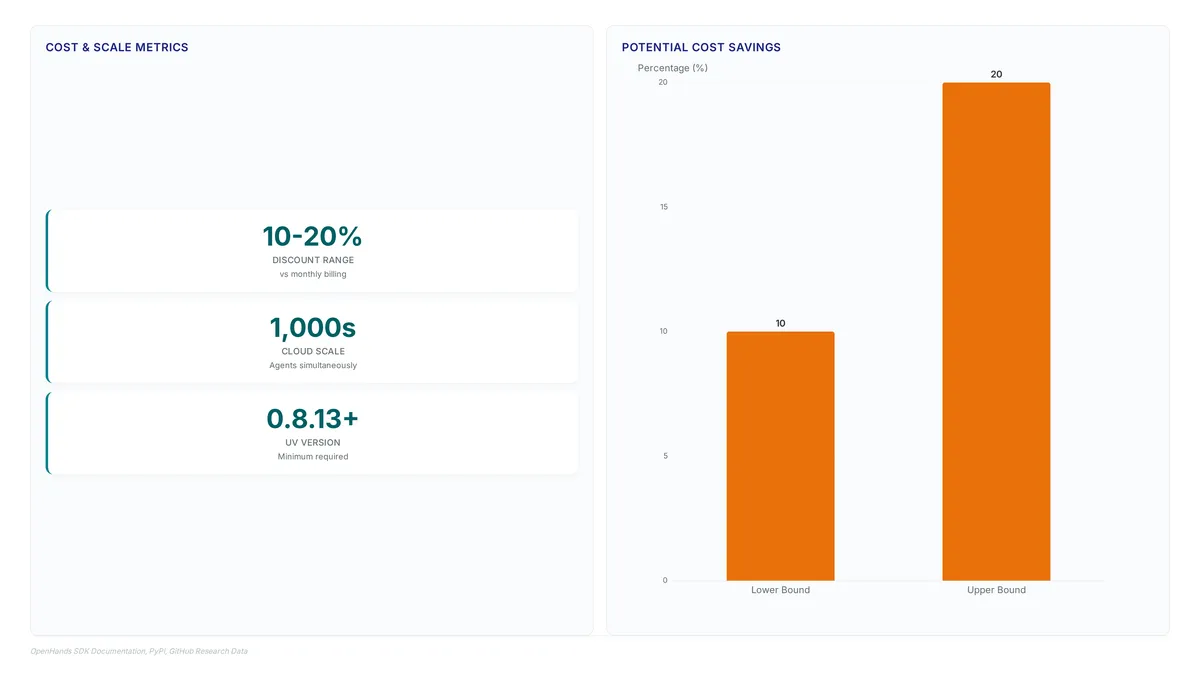
Runtime import failures often stem from version skew between openhands-sdk and openhands-tools. These packages function as a single unit, built, tested, and released together at identical version numbers. Separate installation frequently leaves a newer tools package attempting to import internal utilities from an older SDK, triggering ModuleNotFoundError exceptions.
- Execute a unified upgrade command to resolve both dependencies simultaneously.
- Pin specific releases for both packages if reproducibility is required.
- Avoid installing the core SDK without its corresponding tools package.
The version alignment requirement exists because openhands-tools imports direct internals from the SDK rather than relying solely on public APIs. This tight coupling enables powerful tool use capabilities but eliminates the safety net of semantic versioning between the two libraries. A mismatch breaks the agent workflow before execution begins. Strict dependency management during upgrades becomes mandatory. Operators cannot upgrade one package without the other, or the environment becomes unstable. Deployment scripts must treat the pair as a single atomic unit. Whatever the infrastructure choice, a version mismatch renders the execution environment unusable before it is reached.
Installing uv 0.8.13+ and Configuring Docker Workspaces
Install the uv package manager version 0.8.13 or higher using the command curl -LsSf astral.sh/uv/install.sh | sh to establish a reliable Python runtime. This specific release threshold guarantees compatibility with the dependency resolution logic required by the OpenHands SDK. Builders must secure this foundation before attempting to install SDK components or configure execution environments.
- Clone the repository from GitHub if installing from source rather than PyPI.
- Execute
make buildwithin the project directory to compile dependencies and setup the development environment. - Select Docker as the backend for isolated execution when task requirements demand strict filesystem separation.
The architecture supports pluggable backends, allowing deployment across Docker containers, virtual machines, or existing company infrastructure. Operators gain significant flexibility by choosing between lightweight containers for simple tasks or powerful VMs for heavy compute loads. Choosing source installation introduces maintenance overhead that PyPI binaries avoid entirely. Teams must weigh the need for immediate patch access against the stability of verified releases. Source builds offer bleeding-edge features but require manual dependency management that pre-compiled wheels handle automatically.
Executing Custom Agents and Extending Tool Capabilities
Anatomy of the Hello World Agent Script
The 01_hello_world.py script starts an LLM instance by reading LLM_MODEL environment variables, defaulting to anthropic/claude-sonnet-4-5-20250929. This configuration sets the agent's reasoning capacity before any tool logic executes. Code imports core abstractions like Agent and Conversation from openhands.sdk, separating control flow from execution capabilities. Specific utilities such as FileEditorTool and TaskTrackerTool arrive via openhands.tools, enabling filesystem interaction without custom boilerplate.
Developers interact with these agents through a command-line interface or by writing code directly, offering flexibility beyond single-interface tools. The script constructs a Conversation object using the current working directory as the workspace, constraining the agent's file access to the local project context. Isolation prevents accidental modification of system-critical paths during initial testing. When configured for OpenHands Cloud, the model prefix shifts to openhands/, routing requests through verified backends rather than direct provider APIs.
Builders must explicitly declare tools in the agent definition, as the SDK does not grant implicit system access. Explicit declaration ensures the Agent only possesses minimum permissions required for the assigned task, reducing the attack surface during automation.
Running the Standalone SDK Hello World Example
Execute the examples/01_standalone_sdk/01_hello_world.py script to instantiate an agent that writes project facts to FACTS.txt. This sequence validates the conversation lifecycle by anchoring the workspace to the current directory, ensuring the agent operates within intended file boundaries. Source code defines this behavior by passing os.getcwd as the workspace argument during initialization. Once configured, the script sends the prompt "Write 3 facts about the current project into FACTS.txt" and triggers execution via conversation.run.
Builders can extend functionality beyond the default TerminalTool by importing custom classes into the tool list. Expanding the toolset increases the risk of context window overflow if the agent accumulates excessive token usage during long runs.
Developers seeking to create custom tools should examine 02_custom_tools.py, which demonstrates wrapping external APIs as callable functions. This approach allows integration of proprietary data sources while maintaining the standard agent interface. Successful execution requires setting LLM_MODEL to openhands/claude-sonnet-4-5-20250929 when using OpenHands Cloud to avoid authentication errors. The resulting FACTS.txt file confirms the agent successfully navigated the filesystem and utilized the FileEditorTool.
Checklist for Creating Custom Tools and Activating Skills
Transition to examples/01_standalone_sdk/02_custom_tools.py to define custom tools that extend beyond the default terminal and file editing capabilities. This script demonstrates how to wrap arbitrary Python functions into Tool objects, allowing the agent to execute domain-specific logic rather than generic system commands. Builders should next inspect examples/01_standalone_sdk/03_activate_microagent.py to understand skill activation, where predefined behaviors are injected into the agent's context to modify its reasoning patterns. The repository includes 24+ examples that illustrate these progression steps for various automation scenarios. Skipping the tool registration step in the agent definition causes the model to hallucinate function calls that fail at runtime.
- Import the base Tool class from
openhands.sdkto ensure proper schema generation. - Define the execution logic within a standalone function before wrapping it.
- Append the new tool instance to the agent's tool list prior to conversation initialization.
About
Priya Nair is the AI Industry Editor at AI Agents News, where she tracks product launches and platform shifts for tools like OpenHands. Her daily work involves rigorously evaluating autonomous agent frameworks to provide engineers with accurate, vendor-neutral analysis. This specific expertise makes her uniquely qualified to guide readers through the OpenHands SDK, a modular system for building code-interacting agents. By covering the system's rapid evolution, Priya understands the critical importance of precise tool use and reliable orchestration in production environments. Her role requires dissecting technical prerequisites, such as uv package manager integration and LiteLLM compatibility, ensuring builders receive factual setup instructions rather than marketing hype. At AI Agents News, the focus remains on empowering technical founders and engineers to make informed decisions. This article reflects that mission by translating complex SDK capabilities into clear, actionable steps for developing reliable coding agents.
Conclusion
Two failures account for most broken OpenHands deployments, and both are configuration rather than code: a version gap between openhands-sdk and openhands-tools that stops the agent before it starts, and missing tool declarations that leave the model inventing function calls at runtime. The cost of the second is the compounding time spent debugging undefined calls in production logs, which is why skill activation belongs on the security boundary rather than in the convenience column. Relying on default configurations without explicit tool registration invites instability as you expand from local tests to cloud deployment.
Both are caught by the same habit: pin the pair, declare the tools. Upgrade openhands-sdk and openhands-tools as one atomic unit so the environment never carries a newer tools package against an older SDK, and register every custom function as a Tool object before the conversation starts, so the model has no undeclared call left to invent. The workspace you hand the agent, a local directory, a Docker container or a remote host, changes what it can reach; it does not rescue a build whose two packages disagree.
Frequently Asked Questions
The tools package imports SDK internals rather than a public API, so a newer openhands-tools against an older openhands-sdk raises ModuleNotFoundError at import time, before the agent does any work. Semantic versioning offers no protection across that boundary, which is why the two are upgraded as a single atomic unit.
Version 0.8.13 or higher, because that threshold is what the SDK expects from the dependency resolution logic. Install it before touching the SDK packages: an older resolver does not fail at install time but during agent initialization, which puts the cause far away from the traceback you end up reading.
Yes: a ChatGPT Plus or Pro subscription lets you call LLM.subscription_login() instead of managing raw API tokens. Note what it covers, which is authentication only, and it is a third path alongside direct provider keys and OpenHands Cloud keys; routing still follows the model prefix you set in LLM_MODEL.
The framework isolates tasks within Docker containers or remote sandboxes for security. The Workspace can also be a local directory or company infrastructure, and the agent holds only the tools declared in its definition, so it cannot reach beyond that list.
The model prefix decides routing inside LiteLLM, so a direct provider key with the openhands/ prefix fails authentication immediately. Use a vendor model string with your own key, or set LLM_MODEL to openhands/claude-sonnet-4-5-20250929 with a cloud key.
References