Local AI Agents: Cut 800ms Latency Now
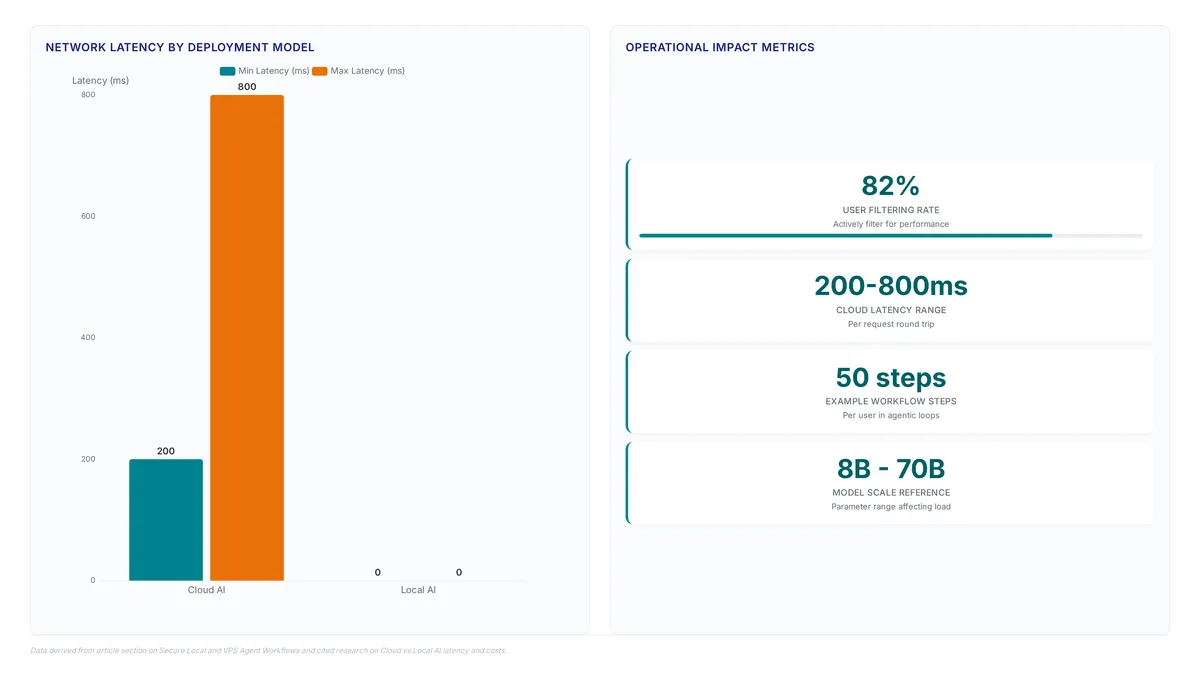
Cloud API round trips introduce 200ms to 800ms latency per request, making deployment architecture the primary bottleneck for real-time agent performance. The only way to cut that penalty is to remove the round trip: an agent running on the developer's own machine, or on a VPS the team owns, answers without leaving the network. Choosing between cloud AI agents and local execution is therefore no longer a question of raw model capability, but a calculated trade-off between latency cost, data sovereignty, and operational isolation, and for most teams the working answer is a split: interactive debugging stays local, long-running and parallel jobs go to a remote box.
The article dissects the operational reality where cloud agents like Devin or OpenAI Codex operate in remote sandboxes, offering clean isolation ideal for team workflows but suffering from the inherent delay of data transit. MindStudio research highlights that this network overhead can range significantly based on model size and load, a critical factor for time-sensitive tasks. Conversely, local solutions like Claude Code eliminate this round-trip penalty by running directly within the user's terminal, though they require the operator to manage environment stability and machine availability.
The analysis moves beyond hype to compare how team collaboration features in cloud environments contrast with the immediate file system access of local agents. By understanding these architectural constraints, teams can avoid the common pitfall of forcing complex, stateful workflows into stateless cloud sandboxes or vice versa.
Defining the Core Deployment Models for Modern AI Agents
Cloud, Local, and VPS Agent Architectures Set
A cloud agent executes within vendor-managed infrastructure, operating inside a remote sandbox to return structured outputs like pull requests. This architecture, exemplified by Devin, isolates workloads from the user's local environment. Conversely, a local agent runs directly on the user's machine, accessing the terminal and filesystem without network transit delays. Claude Code represents this model, using tools already present on the system for immediate interaction. Survey data indicates 82% of users actively filter for these self-hosted options, prioritizing data sovereignty over convenience. A third model, the VPS-hosted agent, deploys local-style execution on cloud infrastructure owned by the operator. This approach merges remote persistence with full environmental control. Unlike managed cloud services, the VPS model requires the operator to maintain uptime and security patches.
| Feature | Cloud Agent | Local Agent | VPS-Hosted Agent |
|---|---|---|---|
| Execution Location | Vendor Infrastructure | User Machine | User-Owned Cloud Box |
| Primary Constraint | Vendor API Limits | Local Hardware Resources | Operator Maintenance |
| Data Residency | Third-Party Controlled | Fully Local | Operator Controlled |
The critical distinction lies in ownership of the runtime environment. While cloud agents simplify asynchronous workflows by removing setup friction, they inherently lack visibility into private local configurations. Local agents offer fidelity to the developer's immediate context but struggle with scalability and availability when the host machine sleeps. The VPS model resolves availability but transfers the burden of infrastructure management to the team. Builders must choose between delegated convenience and direct operational control.
Deploying Devin in Sandboxes Versus Claude Code Locally
Devin operates as a cloud-first autonomous agent built specifically for remote sandbox environments, isolating execution from the user's local filesystem. This architecture delegates tasks to vendor-managed infrastructure, where the agent constructs pull requests or reports without accessing local secrets. In contrast, Claude Code functions as a local agent, running directly within the terminal to use existing system tools and file access. This direct integration allows for immediate interaction with the development environment, a pattern favored by developers who prioritize code sovereignty. The operational divergence centers on environmental visibility versus isolation. Cloud agents like Devin require explicit context provisioning, as they cannot inherently observe local configuration states or private network resources. Local agents avoid this latency but tie task execution to the availability and resource capacity of the host machine. Teams must weigh the convenience of asynchronous, sandboxed workflows against the need for tight control over sensitive data and iterative debugging loops. While cloud deployment simplifies sharing and review processes, local execution remains superior for tasks demanding deep integration with bespoke local tooling and real-time feedback.
Cloud API Latency Costs Versus Local Hardware Investment
Cloud API round trips typically introduce network latency ranging from 200ms to 800ms per request, creating compounding delays in multi-step agentic workflows. This latency profile distinguishes remote execution from local processing, where feedback loops remain near-instantaneous for internal operations. While cloud providers absorb the costs of scaling and model updates, these expenses are baked into per-token pricing structures that scale linearly with usage volume. Conversely, local AI eliminates recurring token costs for inference, shifting the financial burden to electricity and initial hardware purchases. At usage volumes under 5,000 prompts per month, cloud APIs are frequently more cost-effective than purchasing and maintaining local hardware. However, high-volume workloads often justify the capital expenditure of local deployment to avoid variable operational expenses. A VPS represents a distinct middle ground where users rent infrastructure they fully control, differing fundamentally from vendor-managed cloud agents.
The critical tension lies in workflow topology: asynchronous teams tolerate latency for convenience, while interactive development demands the immediacy of local execution. Builders must weigh the operational overhead of maintaining dependency management against the performance penalty of remote execution. For teams requiring persistent environments without sacrificing ownership, a VPS offers the necessary control layer.
Operational Mechanics of Latency Cost and Data Flow in Agent Architectures
OpEx Rental Models Versus CapEx Hardware Burdens in AI Agents
Cloud AI operates on an OpEx rental model where costs scale linearly with success. This variable structure charges per million tokens, meaning highly iterative workflows requiring fifty steps per user cause bills to explode compared to static prompts. Conversely, local AI shifts the financial burden to CapEx via upfront hardware purchases and electricity costs. This model eliminates recurring token fees but introduces hidden labor costs for teams lacking dedicated platform engineering capacity to manage security operations. A critical tension exists here: while cloud agents offer elastic scaling, their cost efficiency collapses when agentic loops become complex. Local infrastructure avoids this volatility but demands continuous maintenance investment. Organizations must calculate total cost of ownership by weighing variable API rates against the fixed depreciation of GPUs and the salary cost of internal maintenance teams. The economic choice ultimately depends on whether workflow unpredictability favors rental flexibility or hardware permanence.
Executing Iterative Coding Loops With Local Agents Versus Handing Off Long-Running Jobs to Cloud
Local agents eliminate network latency for tight feedback loops during active debugging sessions. Cloud AI introduces per-request delay that compounds significantly when an agent requires frequent filesystem access or rapid context switching. This lag disrupts the iterative coding rhythm necessary for fixing interrupted tasks or correcting logic errors in real-time. Developers increasingly adopt tools like Claude Code to maintain direct control over their environment state. These local executors read private configs and internal scripts that remote sandboxes cannot reach without complex synchronization. Conversely, cloud agents excel when the objective is to hand work off for asynchronous completion. They isolate heavy operations in clean sandboxes, preventing local resource exhaustion during long-running jobs. The trade-off involves trusting external infrastructure with code context while accepting higher operational costs for multi-step workflows.
The critical tension lies in environment fidelity versus scalability. Local execution guarantees access to the exact development state but ties the agent to a single machine's availability. Cloud execution offers infinite scale but often fails to replicate the detailed local toolchain, leading to "it works on my machine" failures when deploying generated code. Teams must route interactive debugging to local instances while delegating background refactoring to remote workers.
Hidden Labor Costs of Manual Upgrade Cycles and Dependency Management in Local Deployments
Organizations lacking dedicated platform engineering or SRE capacity must manually fund and manage upgrade cycles, security patches, and dependency management that cloud providers handle automatically. This operational burden creates a hidden labor cost absent in the cloud rental model, where vendors bake maintenance responsibility into per-token pricing. While cloud agents shift scaling and model update costs to the provider, local deployments require internal teams to manage their own security patches and operational surface continuously. For teams with limited engineering capacity, this manual overhead diverts resources from core development tasks toward infrastructure preservation. The decision often hinges on whether an organization can absorb the continuous toil of maintaining a secure, up-to-date local environment versus paying a premium for managed convenience. Without automated tooling, the cumulative time spent resolving dependency conflicts and applying critical fixes becomes a significant drag on velocity. This trade-off forces a strategic choice between direct control and the opportunity cost of internal maintenance efforts. Builders must weigh the tangible benefits of local data sovereignty against the intangible but real expense of engineer hours spent on upkeep. The lack of automatic updates means local environments risk stagnation or vulnerability if not rigorously monitored.
Strategic Selection Criteria for Privacy Security and Team Collaboration
Workflow convenience drives cloud adoption while environmental control anchors local deployments. This split determines whether a team builds for async delegation or interactive iteration.
Matching Team Workflows to Deployment Models
Groups lacking dedicated SRE bandwidth often pick cloud-hosted agents to skip infrastructure management entirely. This operational constraint pushes asynchronous work into managed environments where scaling happens automatically. Interactive development demands the low-latency feedback loop found only when a local agent runs on developer hardware. A frequent pattern sees teams using cloud resources for rapid prototyping before moving stable workflows to self-hosted solutions for data sovereignty.
The VPS-hosted agent offers persistent remote execution while keeping full ownership of the underlying environment. Engineers maintain a Claude Code session on a remote server using tmux, creating a stable workspace accessible from anywhere. This setup enables human-in-the-loop approvals by centralizing execution context outside vendor sandboxes.
Deployment location matters less than approvals and audit logging once an agent touches production systems. Solutions like teamcopilot.ai act as shared infrastructure whether running on a VPS or private cloud. Architectural tension exists between managed service convenience and the necessity of controlling secrets plus execution paths. Strict permission boundaries outweigh ease of setup for most production environments.
Decision Framework: Secret Handling and Access Control Trade-offs
Sandboxed cloud execution and direct local filesystem access present fundamentally different secret exposure risks. Cloud agents trap sensitive data inside vendor boundaries, stopping accidental leakage to the host OS but demanding trust in remote infrastructure security. A local agent pulls environment variables directly, eliminating network transmission of secrets while exposing them to any compromised process on the developer machine. This divergence forces a choice between external isolation and internal sovereignty.
Data sovereignty concerns often make teams reject cloud models despite async review benefits. Data control drives this shift as organizations refuse sending proprietary logic to third-party servers. Local execution moves the entire security burden to the endpoint, requiring host hardening many individual developers cannot perform. A VPS-hosted agent reduces this risk by offering a persistent, remote environment where the team owns patching and access logs. Shared workflows function without losing the audit trail needed for production systems. The final call depends on whether an organization trusts its network perimeter more than a cloud vendor's multi-tenant isolation. AI Agents News recommends evaluating the specific threat model of the data being processed before selecting a deployment strategy.
Implementing Secure Local and VPS Agent Workflows for Development Teams
Defining Secure Credential Boundaries for Local and VPS Agents
Machine-specific tools and private credentials stored only on a device make local agents the cleanest path forward. VPS deployments occupy a different space where the user owns the hosted infrastructure directly.
- Isolate execution environments using Docker containers or virtual machines to restrict file system visibility for local processes.
- Restrict network egress on VPS instances to allow only whitelisted API endpoints, minimizing exposure if credentials are compromised.
- Manage access tokens carefully, as local agents often rely on private credentials that live only on the device or network.
Trust boundaries define the difference between these models.
Configuring Hybrid Workflows for Iterative Coding and Long-Running Jobs
Interactive debugging belongs on local agents while cloud agents handle parallel tasks to optimize team throughput.
- Deploy local instances of Claude Code for active coding sessions where immediate filesystem access and low-latency feedback are critical.
- Provision a VPS to host persistent environments for long-running jobs, ensuring workloads continue even when local machines sleep or disconnect.
- Apply cloud infrastructure for parallel work across many tasks where reproducibility matters more than local convenience.
Separating these roles stops network latency from compounding during multi-step agentic loops. Cloud-only approaches often see costs explode when iterative steps accumulate. Writing results locally first provides speed, then asynchronous uploads to the cloud ensure durability. This architecture decouples compute-intensive generation from the storage layer. Developers maintain direct control over sensitive credentials while offloading heavy batch processing to scalable remote resources. Managed sandboxes offer convenience, yet machine-specific tooling remains necessary for many workflows. Resolving this tension requires treating the VPS as a dedicated workstation rather than a transient container. Split-architecture balances the linear cost scaling of cloud success against the fixed overhead of local ownership. Failure domains become isolated so a stalled local iteration never blocks background data processing.
Mitigating Scaling Failures and Availability Risks in Local Deployments
Host machines that sleep or lack resources for concurrent jobs cause local agent scaling to fail instantly. Cloud alternatives scale elastically while local deployments depend entirely on physical hardware availability and a clean setup. Running several jobs at once introduces infrastructure complexity that managed services typically hide. Operators must manually configure Docker containers or virtual machines to isolate processes and prevent resource contention.
Cloud agent costs scale linearly with success, yet local setups hit a hard ceiling on throughput regardless of task efficiency. Network latency compounds in multi-step workflows when remote dependencies exist, which can stall local orchestration loops. Maintaining low-latency access to local tools while keeping the environment stable under load creates real friction. If the host admits a new job while maxed out, the entire development session risks freezing. Local agents work best as interactive tools optimized for tight back-and-forth debugging rather than parallel workhorses. Offloading heavy concurrency to a VPS remains the necessary architectural compromise for strong availability.
About
Priya Nair serves as AI Industry Editor at AI Agents News, where she tracks the business dynamics and product evolution of autonomous systems. Her daily work involves rigorously analyzing deployment models for tools like Devin, Claude Code, and OpenAI Codex to provide engineers with factual market intelligence. This specific article comparing cloud versus local AI agents stems directly from her continuous evaluation of how vendor-managed infrastructure contrasts with user-controlled environments regarding privacy, cost, and latency. By monitoring funding rounds, platform shifts, and technical releases across the sector, Nair identifies the trade-offs builders face when selecting orchestration strategies. Her reporting connects these high-level industry moves to practical implementation concerns, ensuring the analysis remains grounded in verified data rather than marketing hype. As part of AI Agents News, her work supports the publication's mission to deliver neutral, technically credible insights for software engineers and technical founders navigating the complex environment of agentic AI deployment.
Conclusion
Scaling cloud AI agents exposes a critical friction point where the per-request round trip compounds across multi-step workflows. This delay creates a tangible operational tax that erodes the responsiveness required for tight debugging loops, effectively stalling local orchestration when remote dependencies accumulate. While elastic scaling solves availability, it introduces a linear cost structure that punishes high-frequency iteration. The optimal path forward is not a full migration but a split-architecture strategy that treats the virtual private server as a dedicated, non-transient workstation rather than a fleeting container. This approach isolates failure domains so a stalled local session never blocks background data processing, preserving the agility of local tools while offloading heavy batch jobs. The practical version of that split is the one the comparison keeps pointing to: interactive debugging on a local agent that reads the real filesystem, long-running and parallel jobs on a remote instance that keeps running when the laptop sleeps, and machine-specific tooling left under direct developer control.
Frequently Asked Questions
Cloud API requests introduce significant network latency per interaction. This delay ranges from 200ms to 800ms depending on load, which creates compounding delays in multistep workflows that can frustrate real-time development tasks.
Most users actively filter for self-hosted deployment options to ensure data sovereignty. Survey data shows that 82% of respondents prioritize these local configurations to maintain full control over their private code and environment.
Local agents excel during active coding sessions requiring tight feedback loops. They eliminate the network lag found in cloud models, allowing developers to interrupt and redirect tasks instantly without waiting for remote transit.
Local agents struggle to scale because they depend entirely on your specific machine being available. Unlike cloud setups that handle parallel work easily, local execution halts if the host computer sleeps or lacks sufficient hardware resources.
A VPS offers a middle ground by running local-style agents on cloud infrastructure you own. This setup provides remote persistence and avoids local hardware limits while keeping data residency under your direct operational control.
References